
ACC Utilities Reference Guide

154 Chapter6
ZSCAN - Display ZCOM Tables & Buffers
Running ZSCAN
Scanning Files
The ZSCAN utility can be entered in a runstring with valid options to
display system core files and other types of files. If you run zscan with an
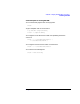
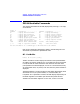
invalid option, it will display its runstring help message, as follows:
Usage: zscan [options] [-m mfile] [-i ifile] [-k kfile]
Options:
-c Memory image file is a system core file
mfile Message text file (standard default)
ifile Memory image file (default: /dev/zmon - running system)
kfile Kernel file: required if -c specified (default: /stand/vmunix)
Normal use of ZSCAN is with no parameters on the runstring, so it
defaults to the running system, default message file
(/opt/acc/msg/default.msg) and non-core file mode. You would not
normally need to specify the -m parameter, but it may be useful for
certain testing.
The ifile parameter is the memory image file which ZSCAN reads to
display the table information. It defaults to /dev/zmon,whichisthe
device file to access the running system. ZSCAN can use a snapshot of
the system, by copying /dev/zmon to a regular fil e and running ZSCAN
with the snapshot file as ifile. You can also specify a core file as ifile,
together with the -c option. If you are running against a core file, ZSCAN
needs to get some information (such as the location of the zcom kernel
memory tables) out of the kernel file.
When -c option is used, the -k option is used to specified the HP-UX
kernel file. If you don’t specify the kfile, ZSCAN uses a default value,
depending on the OS (/hp-ux for 9.xx, /stand/vmunix for 10.xx or later).
Note that ZSCAN does not accept a command file as runstring input. But
if you wanted command input from a file, you should use:
zscan options <commands_file>
The file used must have “ex” as t he last command.