
ACC Utilities Reference Guide

156 Chapter6
ZSCAN - Display ZCOM Tables & Buffers
ZSCAN Available Commands
ZSCAN Available Commands
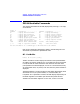
The commands available in Z SCAN (displayed by entering ?, ?? or help)
are as follows:
zscan> ??
Command - Description ................ Command - Description ...........
en - Display ZCOM environment dm - Display ZCOM memory
zl - Display ZLU information lt - Display logical terminal
pt - Display physical terminal it - Display interface table
te - Display PTTs on a mux qs - Scan for non-empty queues
qh - Display program queue header bf - Display system buffer
nd - Display node information rr - Display response records
dsc - Dynamic System Config. info.
!cmd - Execute shell command ”cmd” ex,exit - Exit ZSCAN program
?, ?? - Help on a specific command help - Print this table
For more information of a command type ”? XX” where XX is the command
Each of the commands is described in detail in the following text. The
commands are presented in alphabetical order.
BF - List Buffer
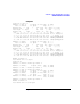
Format: bf <loc|all> [count]]
The BF command is used to display the contents of the specified buffer
(or buffers) at location of address “loc”. If the optional [count] parameter
is used, ZSCAN will follow the buffer chain down the list until either
[count] buffers have been displayed, or a n error is encountered (usually
an end of buffer chain). If [count] i s not used, then only the first buffer is
displayed.
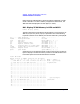
The buffer address is usually found from information displayed by other
commands such as QH (Queue header), IT (Interface table), etc.
If keyword “all” is specified as location, ZSCAN displays sequentially all
the buffer segments in the buffer pool. ZSCAN also performs basic
validation of e ach buffer s egments. In this case, “count” is not used.