
ACC Utilities Reference Guide

Chapter 6 159
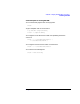
ZSCAN - Display ZCOM Tables & Buffers
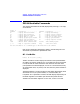
ZSCAN Available Commands
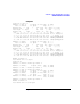
………
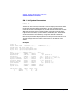
Note that the table shown in the example has had lines removed to
reduce the size of the display. The “…” represent one or more lines that
have been deleted.
DSC - Dynamic System Configuration
Format: dsc
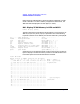
This command shows some internal kernel information about the
dynamic system configuration of the ZCOM subsystem. The DSC feature
allows the ZCOM configuration (as defined in the TTGEN file) to be
modified while the s ystem is running. W hen a DSC request is
in-progress, some system activities must be suspended.
zscan> dsc
Total number of DSC requests = 17
Number of active requests = 0
Number of DSC or lock waiters = 0
The above shows the total number of DSC requests that has been
processed, the number of DSC requests that is in-progress, and the
number processes suspended because there is a ctive DSC request.
If the number of active requests is negative (i.e. -1), DSC are disabled
and any such request will be rejected w ith an e rror.