
ACC Utilities Reference Guide

160 Chapter6
ZSCAN - Display ZCOM Tables & Buffers
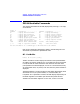
ZSCAN Available Commands
EN - List System Parameters
Format: en
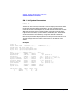
The EN (or environment) command is used to display information about
the ZCOM subsystem global parameters. As well as displaying the
names of the source and object files, the EN command also returns table
addresses and sizes of the Interface Tables, Physical Terminal tables,
Logical Terminal tables, Queue Headers, and Buffer pool. These tables
can be examined in more detail by using other ZSCAN commands.
Most of the parameters displayed here are setup from the entries in the
TTGEN configuration file. Refer to the section on TTGEN for more
details.
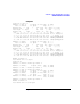
Example:
zscan> en
Header label: ZCOM ZCOM Rev: 6.2.0.0 TTGEN Rev: 1.1.0.0
System name: ACC ttgen input file
Source file: /opt/acc/cfg/loopback.answ
Object file: /opt/acc/cfg/loopback.tmem
Area............... Address (hex)...... Size.....
System Header 00AFEB40 - 00AFF0F7 1464
Node Entries 00AFF0F8 - 00AFF27F 392 (Entries 1)
ZLU Entries 00AFF280 - 00B09E5F 44000 (Term 1000, Prog 100)
Logical Terminals 00B09E60 - 00B8A05F 524800 (Entries 800, Size 656)
Physical Terminals 00B8A060 - 00BD825F 320000 (Entries 800)
Interface Tables 00BD8260 - 00BF181F 76672 (Entries 2)
Response Records 00BF1820 - 00BF375F 8000 (Entries 100)
Queue Headers 00BF3760 - 00BF4D77 5656 (Entries 101)
Buffer Pool 00BF4D78 - 00EFEAFF 3186056
System Total: 00AFEB40 - 00EFEAFF 4194240
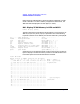
LTT.Storage Label Appln Offset Size
1 X25CNT 10 400 88
2 ANLYZR 90 400 128