
ACC Utilities Reference Guide


166 Chapter6
ZSCAN - Display ZCOM Tables & Buffers
ZSCAN Available Commands
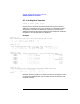
PT - List Physical Terminal
Foramt: pt [first] [last] [c|q|r]
Display physical terminal table information from Physical Terminal
Table (PTT) numbers [first] to [last]. If option [c] is specified, the static
configuration information is displayed. If option [q] is specified, the
detailed information about the PTT data queues is displayed. Otherwise,
the general run-time information is displayed.
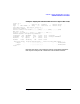
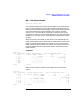
Example:
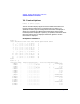
zscan> pt 1 2
PTT# ZLU# Mx:P:Sc:Term* DrStt FwStt NxtPTT XpsPTT HtxPTT LtxPTT
1 1 0:0:**:00000 9000h A100h 2
2 300 0:0:**:00001 F000h 0800h 3
zscan> pt12c
PTT# ZLU# Mx:P:Sc:Term* PType Poll. Slct. Optn. V.C.# Config..........
1 1 0:0:**:00000 25 4008h 48EAh 003Ah 4 0000000000000000
2 300 0:0:**:00001 26 4000h 0000h 0350h 0 0000000000000000
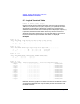
zscan> pt12q
PTT# Queue N.Msg N.Bytes Head:Tail(hex)... Waits Total.Msg Max.M Limit......
1 XPSok 0 0 00000000:00000000 0 0 2147483647M
1 HTXok 0 0 00000000:0043036C 2 1 100M
1 LTXok 0 0 00000000:00000000 0 0 100M
1 UAQok 0 0 00000000:0043036C 2 1 5000B
2 XPSok 0 0 00000000:00000000 0 0 2147483647M
2 HTXok 0 0 00000000:00000000 0 0 100M
2 LTXok 0 0 00000000:00000000 0 0 100M
2 UAQok 0 0 00000000:00000000 0 0 5000B
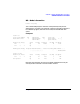
zscan> pt12r
PTT# ZLU# Mx:P:Sc:Term* PRZLU(Node#) PCZLU(Node#) SHARED ZLUs(Node#)
1 1 0:0:**:00000 1001(00123) 0(00000)
2 300 0:0:**:00001 0(00000) 0(00000)
zscan>
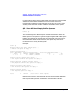
Note that when the [q] option is used, the values in the Head:T ail column
are the buffer addresses that may be used by the BF command to view
the buffer contents.