
ACC Utilities Reference Guide


Chapter 6 167
ZSCAN - Display ZCOM Tables & Buffers
ZSCAN Available Commands
QH - List Queue Header
Format: qh [first] [last]
This command displays the program queue headers in the range [first] to
[last].If[last]isomittedonly[first]queueheaderisdisplayed.If[first]
and [last] are omitted then queue header 0 (free queue) is displayed. The
freequeuemanagesthelistoffreebuffersinthesystem.Theother
queues (1,2,3...) are reserved for pr ogram ZLUs: queue 1 is f or the 1st
program ZLU, queue 2 is for the 2nd program ZLU, e tc. If the associated
program ZLU is not open (not in use), the queue is disabled and is shown
as “stop”.
When the system is initialized, or when there are no outstanding used
buffers all the buffer space is contained in two free buffers. The first free
buffer is a 32-byte dummy buffer and is never for use. The second free
buffer contains all the free space. The values in the Head:Tail column are
the buffer addresses t hat may be used by the BF command t o view the
buffer contents.
Examples:
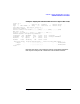
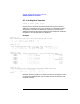
zscan> qh 0 6
Queue ZLU# N.Msg N.Bytes Head:Tail(hex)... Waits Total.Msg Max.M Limit......
0 FreeQ 2 3185992 00BF4D80:00BF4D80 2581 3 1M
1 1001 0 0 00000000:00BF4DA8 1 2578 1 10000M
2 1002 0 0 00000000:00000000 0 0 2147483647M
3 Stop 0 0 00000000:00000000 0 0 0M
4 Stop 0 0 00000000:00000000 0 0 0M
5 Stop 0 0 00000000:00000000 0 0 0M
6 Stop 0 0 00000000:00000000 0 0 0M
Total: 2 3185992
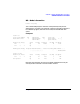
When some free space is allocated, some buffers are linked to other
queues.
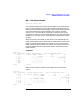
zscan> qh 0 6
Queue ZLU# N.Msg N.Bytes Head:Tail(hex)... Waits Total.Msg Max.M Limit......
0 FreeQ 2 3185656 00BF4D80:00BF4D80 3370 0 3M
1 1001 0 0 00000000:00BF4EF8 1 3367 1 10000M
2 1002 0 0 00000000:00000000 0 0 2147483647M
3 1003 2 336 00BF4DA8:00BF4E50 2 2 200M
4 1004 0 0 00000000:00000000 0 0 200M
5 Stop 0 0 00000000:00000000 0 0 0M
6 Stop 0 0 00000000:00000000 0 0 0M
Total: 4 3185992