
ACC Utilities Reference Guide


Chapter 7 181
ZMLOG - Diagnostic Message Logging
ZCOM Diagnostic Message Logging Mechanism
Setting Up Customized or Application Specific
Messages
Each message that can be generated by ZCOM, its daemons, its utilities,
or application programs using the ZCOM services, must have a
corresponding entry in the message file. Th e entries in the message file
are organized by program or module name, and message number within
that program or module. The message file is generated from one or more
text files.
When ZCOM is installed, a file default.txt is put in the directory
/opt/acc/msg. This file contains the list of text files used to make the
message file. The utility txt2msg takesthisfileandconvertsthistothe
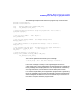
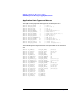
runtime message file. T he file default.txt will contain entries such as
those shown below:
#include ”def.ltest.txt”
#include ”def.zmlog.txt”
#include ”def.zcom.txt”
#include ”def.zmon.txt”
#include ”def.ttgen.txt”
#include ”def.zscan.txt”
#include ”zerrmsg.txt”
#include ”zstatmsg.txt”
#include ”def.zcbug.txt”
#include ”def.watch.txt”
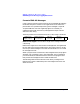
The convention for naming these files is:
<lang>.<program>.txt
Here <lang> is an indicator describing the language of the text and
<program> is the name of the program or module that generates the
messages. The default language is English and ha s the prefix of def.
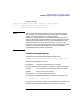
When txt2msg is run, it is passed a parameter used to build the name of
the input file, and the na me of the output or message file. For the default
language the run string would b e:
txt2msg default
This uses the input file /opt/acc/msg/default.txt and generates the
output message file /opt/acc/msg/default.msg.ForaFrenchlanguage
file, txt2msg might b e run as follows:
txt2msg french