
ACC Utilities Reference Guide

Chapter 7 187
ZMLOG - Diagnostic Message Logging
ZCOM Diagnostic Message Logging Mechanism
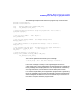
Example of usage :
zcomlog (error_number, message_number, numb_vars, Zc_INT(var_value));
/* Note : INT(argument_value_1) is expanded into 2 */
/* arguments,namely : ZCOM_AT_INT, var_value */
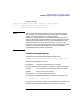
NOTE ZMLOG internally uses sprintf() to convert the arguments to display
text. However, due to technical difficulty with sprintf() in supporting
arbitrary 64-bit parameters (i.e. ZCOM_AT_INT64 or
ZCOM_AT_UINT64), ZMLOG ca n only display the value of the lower
32-bit for each 64-bit argument logged. This means a program may log a
message with 64-bit arguments, say, using Zc_INT64(value),butthe
message te xt should use conversion specification, say %d,forsuch
arguments. %ld or %lld should not be used. When this technical problem
is resolved in the future, the message text can then be modified to
accommodate 64-bit conversion specification.
Format of Message Displays
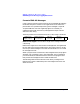
ThebasicformatofthemessagesdisplayedbyZMLOGis:
[HH:MM:SS] [Program_Name][Error#] [Level#] [Error message text]
Where the following fields are used:
[HH:MM:SS]Timethatacclog read the error message
[Program_Name] Name of program or module that generated message
[Error#] Error number of the message for reference 0-99999
[Level#] Priority level of the message
[Message text] 1 to 200 character message t ext
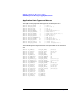
For example a message generated by the zcom driver would look like:
19:23:18 zcom 00000 _ System bootup
The priority level for this message is 0 and is displayed a s a blank in the
message. In this example the position is shown by the _ character.