
ACC Utilities Reference Guide




198 Chapter8
ZMON - ZCOM Control Program
ZMON Command Descriptions
Status
Function: Display ZCOM subsystem status
Format: zmon status
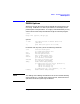
TheSTATUSrequestcommandisusedtodisplaytheZCOMsystem
status in the ZCOM message log. For example if ZCOM is running The
following would be expected:
zmon status
14:32:18 zmon 00002 Resource manager (Rev 1.32) for ZCOM 6.2.0.0
14:32:18 zmon 00006 Getting ZCOM system status ...
14:32:18 zmon 00062 Status since Fri Sep 4 14:31:31 -Ready(running)
Queue
Function: Warm start ZMON
Format: zmon queue
If ZMON terminates or is killed (although unusual), it may be restarted
using the QUEUE command. Since all of the ZCOM context data is kept
in the ZCOM kernel tables, ZMON can be restarted at any time with this
command.
ZMON usually waits for events on the /dev/zmon device file queue.
During normal operation no events are posted to this queue, however, if
for example, a Mux fails for some reason, a failure event is added to the
queue by the LDM, and ZMON is awoken. ZMON will then read the
event from the queue and take the appropriate action.
Restart
Function: Restart Mux card
Format: zmon restart <mux#>
This command is used to manually restart the firmware on a Mux card.
Thismayberequiredforexampletoupdatethesoftwareonthecard.
When the card is restarted the card is reset, downloaded, configured, and
restored to the state immediately before the restart.
This command should be used with care since it will interrupt all
communication on the card and can potentially ca use d ata loss. Other
Mux cards are not affected.