
ACC Utilities Reference Guide

Chapter 3 73
ZLINK - Z80/Z180 Relocating Linker
Using ZLINK
Using ZLINK
Introduction
Commands for ZLINK can be made via:
1. An interactive ZLINK session
2. A ZLINK command file
The usual method of running ZLINK is via ZLINK command files, which,
for the ZCOM system, are supplied with the ZCOM relocatable files.
Command Files
To run ZLINK using a command file, enter at a shell prompt:
$ zlink <commandfilename>
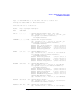
Asamplecommandfile(tocreatetheabsolutecodefortheHDLCLAP-B
protocol), is listed below. This assumes you are executing the zlink
command from the /opt/acc/ directory. When ZL INK executes this
command file it produces an executable download file called
z7400a/hdlc.zabs and a list file z7400a/hdlc.zmap. The list file contains
theabsoluteaddressesofthemoduleswithintheZ180subsystem.These
addresses are needed when tracing execution of the protocol modules
using a logic analyzer (e.g., HP16500A with HP10336H Z180 probe). See
the XR and MA detailed command description for examples of the map
file output.
ma z7400a/hdlc.zmap (Specify map listfile name)
nam VMUX-1.1 HDLC Download file for HP-UX Zcom System
sn sys/z7400_rom.zsnp (Mux kernel entrypoints)
org,fworg,proglim (Set origin for Mux kernel)
re sys/z7400_fw.zrel (Mux kernel)
re protocol/level1.zrel (Line Tx/Rx handling protocol module)
re protocol/hdlcabm.zrel (HDLC/LAP-B protocol module)
re protocol/monitor.zre (Monitor protocol module)
re protocol/testprot.zrel (Loopback protocol module)
org,eptable (Set origin for protocol entrypoint table)
re sys/pmenttab.zrel (Default protocol entrypoint table)
ab z7400a/hdlc.zabs (Specify absolute output file)
end