
ACC Utilities Reference Guide


Chapter 4 97
ZMNTR - ZCOM Runtime Monitor
Running ZMNTR (ZCOM Runtime Monitor)
Running ZMNTR (ZCOM Runtime Monitor)
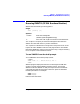
ZMNTR has the following runstring options:
Usage:
zmntr [-m mfile] [-k]
Options:
-m mfile Alternate message file
(default /opt/acc/msg/default.msg)
-k Don't fork “ied” to get Korn shell like command stack
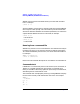
The -m option is to specify an alternate message file other than the
default one comes with the ACC product installation.
The-koptionistodisabletherunningofthe“ied”processtoactasthe
input front-end to ZMNTR. Refer the man page of ied for more details.
Note that if ZMNTR is used in a non-interactive way, it may be necessary
touse-koptiontoavoidundesiredresults.
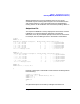
To run ZMNTR from the shell prompt
To run ZMNTR from the shell prompt $ enter:
$ zmntr
ZMNTR: ZCOM 6.2.0.0 Runtime Monitor, Rev 1.0
ZMNTR>
ZMNTR program displays the banner line showing the ZCOM data
structure version and the ZMNTR program revision. The prompt
ZMNTR> indicates ZMNTR is ready to accept interactive commands.
Commands a re entered using either commas or spaces as delimiters
between parameters. For example:
ZMNTR> tt 1 5
ZMNTR> tt,1,5
both have the same effect.