
HyperFabric Administrator's Guide (HP-UX 11i v1)

Troubleshooting HyperFabric
LED Colors and Their Meanings
Chapter 6 159
LED Colors and Their Meanings
Listed below are the possible colors (and the corresponding meaning) of
the LEDs on the HyperFabric adapters and switches.
Adapter LEDs
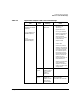
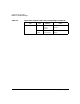
Table 6-1 below shows the names of the LEDs on each HyperFabric
adapter. Note that the LEDs on the A4920A adapter are labeled, but the
labels might be hard to see when a cable is connected to the adapter.
Some of the LEDs—“Connected/Traffic,” “Link,” and “Link
Connected/Traffic”—are equivalent but are labeled differently,
depending on the adapter. So, their colors and meanings are the same,
regardless of the adapter.
The HyperFabric adapter LED colors and meanings are as follows:
✓ If the adapter is not operational, the “Connected/Traffic”, “Link”, or
“Link Connected/Traffic” LED on the adapter is off. Some of the
possible reasons for this happening are the following:
— The HP 9000 is not operational.
— HyperFabric has not been started on the HP 9000.
Table 6-1 LED Names (by Adapter)
LED Name
HyperFabric
Adapter
“Connected/Traffic” A4919A
A6092A
“Link” A4920A
A6386A
“Link
Connected/Traffic”
A4921A
“Error” All