
HyperFabric Administrator's Guide (HP-UX 11i v1)


Troubleshooting HyperFabric
LED Colors and Their Meanings
Chapter 6 169
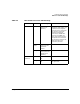
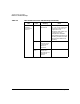
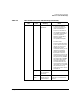
Table 6-4 HF2 Switch LED Colors and Meanings
LED Color Meaning Notes
“Status” None The card/switch
module is not
operating.
Integrated Ethernet
management LAN adapter card
(in the top slot) & integrated
8-port fiber card (in the middle
slot): the card can be safely
removed by qualified HP
personnel only. A6388A HF2
8-port fiber or A6389A HF2
4-port copper switch module in
the expansion slot (the bottom
slot): the switch module can be
safely removed by you or
qualified HP personnel.
Solid
yellow
A fault is
occurring on the
card/switch
module.
Solid green The card/switch
module passed the
self-test and is
operating.
“Power A” and
“Power B”
None Power to switch is
off.
Solid green Power to switch is
on.
One LED solid green: switch is
still operational.