
HyperFabric Administrator's Guide (HP-UX 11i v1)

Planning the Fabric
TCP/UDP/IP
Chapter 220
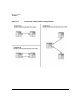
You can interconnect (mesh) up to 4 switches (16-port copper, 16-port
fiber, or Mixed 8 fiber ports / 4 copper ports) in a single HyperFabric
cluster.
• Trunking Between Switches (multiple connections)
You can use trunking between switches to increase bandwidth and
cluster throughput. Trunking is also a way to eliminate a possible
single point of failure. The number of trunked cables between nodes
is limited only by port availability. To assess the effects of trunking
on the performance of any particular HyperFabric configuration,
contact your HP representative.
• Maximum Cable Lengths
HF1 (copper): The maximum distance between two nodes or between
a node and a switch is 60 ft. (Two standard cable lengths are sold and
supported: 35 ft. and 60 ft.)
TCP/UDP/IP supports up to 4 HF1 switches connected in series with
a maximum cable length of 60 ft. between the switches and 60 ft.
between switches and nodes.
HF2 (fiber): The maximum distance is 200m (Four standard cable
lengths are sold and supported: 2m, 16m, 50m and 200m).
TCP/UDP/IP supports up to four HF2 switches connected in series
with a maximum cable length of 200m between the switches and
200m between switches and nodes.
TCP/UDP/IP supports up to four hybrid HF1/HF2 switches
connected in series with a maximum cable length of 60 ft. between
copper ports and 200m between fiber ports.