
HyperFabric Administrator's Guide (HP-UX 11i v1)

Installing HyperFabric
Installing HyperFabric Switches
Chapter 3 65
WARNING To prevent overheating, you must leave one rack unit (1 EIA)
of empty space above the HyperFabric switch.
❏ After the HyperFabric switch is mounted in the rack, attach the
various cables to the switch.
To avoid damage to any of the cables, follow these guidelines:
— If your cables have dust caps over the connectors, keep them in
place until you are ready to connect them. This prevents dirt and
oils from soiling any important surfaces.
— Be careful not to stretch, puncture, or crush the cable.
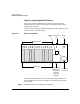
To install an HF1 switch, see the next section, “Steps for Installing the
HF1 Switch” on page 66.
To install an HF2 switch, see “Installing the HF2 Switch” on page 74.