
HyperFabric Administrator's Guide (HP-UX 11i v1)

Installing HyperFabric
Installing HyperFabric Switches
Chapter 3 71
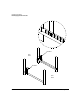
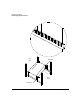
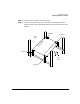
Step 6. Tighten all four screws in brackets 3 and 4.
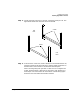
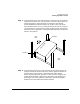
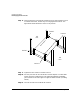
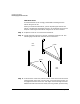
Step 7. From the front of the rack, push the switch so that it barely touches
brackets 3 and 4. The figure below shows how to move the switch to this
position.
bracket 3
bracket 4
bracket 2
bracket 1
f
r
o
n
t
o
f
s
w
i
t
c
h
front
back
rack
rack