
HyperFabric Administrator's Guide (HP-UX 11i v1)

Installing HyperFabric
Installing HyperFabric Switches
Chapter 372
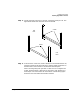
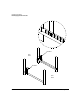
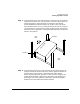
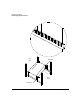
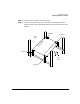
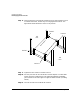
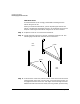
Step 8. Once the switch is snug against brackets 3 and 4, push brackets 1 and 2
in towards the switch, so that they are snug against the switch. The
figure below shows brackets 1 and 2 in this position.
Step 9. Tighten the four screws in brackets 1 and 2.
Step 10. For each port that will be connected to an HF1 adapter in an HP 9000
system, attach the cable from the corresponding adapter. Remember,
your connections must be copper-to-copper and fiber-to-fiber (including
cables).
Step 11. Connect the switch to the Ethernet network.
bracket 3
bracket 4
bracket 2
bracket 1
f
r
o
n
t
o
f
s
w
i
t
c
h
front
back
rack
rack