
HyperFabric Configuration Guidelines

HyperFabric Configuration Guidelines
TCP/UDP/IP
15
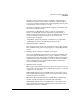
(*) The A4919A is supported on only N-4000 servers with the PA-8500
HP PA-RISC processor. To determine if your N-4000 has a PA-8500
processor, use the “Information Menu” from the BCH “Main Menu” to
check the systems firmware version. If the firmware version is earlier
than 3.0, the system has a PA-8500 processor (and so the A4919A is
supported on it). If the firmware version is 3.0 or later, the A4919A is not
supported.
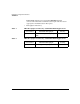
(**) Although the A6092A HyperFabric adapter is supported on HP 9000
Superdome systems, HP recommends that you use only HF2 adapters
and cables in Superdome systems. The reason is that the A4892A copper
HyperFabric cable is not flexible enough to use in the cable management
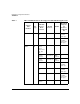
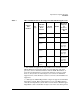
rx56XX
servers
11i v2 No 4
zx6000
workstation
s
11i v2 No 1
SD64A
servers
11i v2 Yes 8
(maximum
4 per PCI
card cage)
rx7620
servers
11i v2 No 8
(maximum
4 per PCI
card cage)
rx8620
servers
11i v2 Yes 8
(maximum
4 per PCI
card cage)
rx4640
servers
11i v2 Yes 6
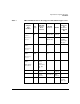
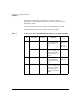
Table 3 HF1 and HF2 Hardware that Supports TCP/UDP/IP Applications
Adapter
Part
Number
Bus
Type
HP 9000
Server /
Work
Station
HP-UX
Release
OLAR
Maximum
Adapters
per
Instance
of HP-UX
OS