
HyperFabric Configuration Guidelines








HyperFabric Configuration Guidelines
TCP/UDP/IP
17
TCP/UDP/IP Supported Configurations
Multiple TCP/UDP/IP HyperFabric configurations are supported to
match the cost, scaling and performance requirements of each
installation.
In the section “Configuration Parameters” on page 10, the maximum
limits for TCP/UDP/IP enabled HyperFabric hardware configurations
were outlined. In this section the TCP/UDP/IP enabled HyperFabric
configurations that HP supports are explained. These recommended
configurations offer an optimal mix of performance, availability and
practicality for a variety of operating environments.
There are many variables that can impact HyperFabric performance. If
you are considering a configuration that is beyond the scope of the
following HP supported configurations, contact your HP representative.
Point-to-Point Configurations
You can interconnect large servers like the HP Superdome to run Oracle
RAC 9i and enterprise resource planning applications. These
applications are typically consolidated on large servers.
Point-to-point connections between servers support the performance
benefits of HMP without investing in HyperFabric switches. This is a
good solution in small configurations where the benefits of a switched
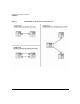
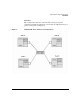
HyperFabric cluster might not be required (see configuration A and
configuration C in Figure 1).
If there are multiple point-to-point connections between two nodes, the
the traffic load will be balanced over those links. If one link fails, the load
will fail over to the remaining links (see configuration B in Figure 1).
Running applications using TCP/UDP/IP on a HyperFabric cluster
provides major performance benefits compared to other technologies
such as Ethernet. If a Hyperfabric cluster is originally set up to run
enterprise applications using TCP/UDP/IP and the computing
environment stabilizes with a requirement for higher performance,
migration to HMP is always an option.