
HyperFabric Configuration Guidelines


HyperFabric Configuration Guidelines
Hyper Messaging Protocol (HMP)
44
If any of the above conditions is true, SAM displays an appropriate
error message. Otherwise, the
/etc/rc.config.d/clic_global_conf file is updated with
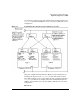
information about the configured card pairs. If Card-Pair 0
comprises of adapters clic0 and clic1 and if the Card-Pair 1,
comprises of adapters clic2 and clic3, then the following entries are
added to the clic_global_conf file.
CARD_PAIR[0] = clic0-clic1
CARD_PAIR[1] = clic2-clic3
If you press Cancel, you remain in the main “HyperFabric
Configuration” screen.
If you press Help, help text for this task appears.
Step 6. Exit SAM.
NOTE To view the Card-Pair information from the
/etc/rc.config.d/clic_global_conf file, select “View Local
Failover Configuration for HMP” option in the “HyperFabric
Configuration” screen.
Deconfiguring HMP for Local Failover support
To use SAM to deconfigure HMP for Local Failover support, follow these
steps:
Step 1. Start SAM.
Step 2. Select the “Networking and Communications” area.
Step 3. Select “HyperFabric.”
All HyperFabric adapter card pairs installed in the system are listed.
Step 4. Pull down the “Actions” menu and select Deconfigure Local Failover
for HMP to remove all the card pair entries from the
/etc/rc.config.d/clic_global_conf file.In the next confirmation
window that pops-up, select YES to confirm it.
If you select NO. you remain in the main “HyperFabric Configuration”
screen.