
AB291A Fabric Clustering System Support Guide (12-port Switch), April 2004
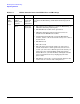
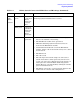
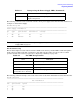

Table Of Contents
- About This Document
- 1 Introduction to Technology
- 2 Hardware Overview
- 3 Installation Planning
- 4 Installing HP Fabric Clustering System
- 5 Administration and Management
- HP-UX Host Administration and Management
- Switch Administration and Management
- CLI Overview
- Using the CLI
- Advanced Switch Setup
- Configuration, Image, and Log Files
- Configuration, Image, and Log File Overview
- File Management
- Listing Configuration, Image, and Log Files
- Viewing Configuration Files
- Viewing Log Files
- Saving Configuration Files
- Saving for System Reboot
- Saving the Backup Configuration
- Specifying the Configuration to Use at
- Saving and Copying Files
- Downloading Files to the System
- Deleting Configuration, Image, and Log Files
- Managing Log Files
- Understanding the Log Format
- Uploading Log Files
- Administering the System
- 6 Monitoring and Troubleshooting
- A Specifications
- B HP 12-Port 4X Fabric Copper Switch Commands
- Show Commands
- show arp ethernet
- show arp IB
- show authentication
- show backplane
- show boot-config
- show card
- show card-inventory
- show clock
- show config
- show fan
- show host
- show ib
- show ib sm configuration
- show ib sm multicast
- show ib sm neighbor
- show ib sm node subnet-prefix
- show ib sm partition
- show ib sm port
- show ib sm service
- show ib sm switch
- show ib-agent channel-adapter
- show ib-agent summary
- show ib-agent switch
- show ib-agent switch linear-frd-info
- show ib-agent switch all mcast-info lid
- show ib-agent switch all node-info
- show ib-agent switch all pkey-info
- show ib-agent switch port-info
- show ib-agent switch sl-vl-map
- show ib-agent switch switch-info
- show interface ib
- show interface ib sm
- show interface ib sm statistics
- show interface mgmt-ethernet
- show interface mgmt-ib
- show interface mgmt-serial
- show ip
- show location
- show logging
- show ntp
- show power-supply
- show running-status
- show sensor
- show snmp
- show system-services
- show terminal
- show trace
- show user
- show version
- IP Commands
- HP Fabric Clustering System Commands
- Administrative Commands
- action
- boot-config
- broadcast
- card
- clock
- configure
- copy
- delete
- dir
- disable
- enable
- exec
- exit
- ftp-server enable
- gateway
- help
- history
- hostname
- install
- interface
- interface mgmt-ethernet
- interface mgmt-ib
- ip
- location
- login
- logging
- logout
- more
- ntp
- ping
- radius-server
- reload
- shutdown
- snmp-server
- telnet
- terminal length
- terminal time-out
- trace
- type
- username
- who
- write
- Show Commands
- C How to Use Windows HyperTerminal
- Glossary

Chapter 6
Monitoring and Troubleshooting
Diagnosing Problems
103
Physical
Link
Status
(bottom)
Flashing
green
Data is
flowing from
HCA to
switch port
or remote
HCA.
Note that data does not start to flow until HP Fabric
Clustering System initialization has occurred.
Solid green Connection
from HCA to
switch port
or remote
HCA is
operational.
None HCA is not
operational.
• The drivers on the attached HP Fabric Clustering System
host are not installed or not running.
• The HP-UX host machine is not operational.
• HP Fabric Clustering System software has not been
started on the HP-UX host machine.
• A Fabric HCA is installed in a slot in the HP-UX host
machine, but the cable is attached incorrectly or no cable is
attached at all.
•The HCA is bad.
• The cable is bad.
• The switch port is bad (if the adapter is connected to a
switch). Note that if a switch port is bad, and (for some
reason) you cannot use a different port on the switch, you
must replace the entire HP Fabric Clustering System
Switch. However, you first should try turning the switch's
power off and then back on.
• The HCA is connected to a non-operational adapter in the
remote node (in a node-to-node configuration).
Table 6-1 HCA & Switch Connection LED Colors and Meanings (Continued)
LED Color Meaning Notes