
AB291A Fabric Clustering System Support Guide (12-port Switch), April 2004
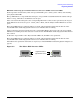
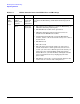
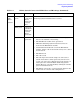
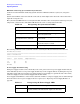

Table Of Contents
- About This Document
- 1 Introduction to Technology
- 2 Hardware Overview
- 3 Installation Planning
- 4 Installing HP Fabric Clustering System
- 5 Administration and Management
- HP-UX Host Administration and Management
- Switch Administration and Management
- CLI Overview
- Using the CLI
- Advanced Switch Setup
- Configuration, Image, and Log Files
- Configuration, Image, and Log File Overview
- File Management
- Listing Configuration, Image, and Log Files
- Viewing Configuration Files
- Viewing Log Files
- Saving Configuration Files
- Saving for System Reboot
- Saving the Backup Configuration
- Specifying the Configuration to Use at
- Saving and Copying Files
- Downloading Files to the System
- Deleting Configuration, Image, and Log Files
- Managing Log Files
- Understanding the Log Format
- Uploading Log Files
- Administering the System
- 6 Monitoring and Troubleshooting
- A Specifications
- B HP 12-Port 4X Fabric Copper Switch Commands
- Show Commands
- show arp ethernet
- show arp IB
- show authentication
- show backplane
- show boot-config
- show card
- show card-inventory
- show clock
- show config
- show fan
- show host
- show ib
- show ib sm configuration
- show ib sm multicast
- show ib sm neighbor
- show ib sm node subnet-prefix
- show ib sm partition
- show ib sm port
- show ib sm service
- show ib sm switch
- show ib-agent channel-adapter
- show ib-agent summary
- show ib-agent switch
- show ib-agent switch linear-frd-info
- show ib-agent switch all mcast-info lid
- show ib-agent switch all node-info
- show ib-agent switch all pkey-info
- show ib-agent switch port-info
- show ib-agent switch sl-vl-map
- show ib-agent switch switch-info
- show interface ib
- show interface ib sm
- show interface ib sm statistics
- show interface mgmt-ethernet
- show interface mgmt-ib
- show interface mgmt-serial
- show ip
- show location
- show logging
- show ntp
- show power-supply
- show running-status
- show sensor
- show snmp
- show system-services
- show terminal
- show trace
- show user
- show version
- IP Commands
- HP Fabric Clustering System Commands
- Administrative Commands
- action
- boot-config
- broadcast
- card
- clock
- configure
- copy
- delete
- dir
- disable
- enable
- exec
- exit
- ftp-server enable
- gateway
- help
- history
- hostname
- install
- interface
- interface mgmt-ethernet
- interface mgmt-ib
- ip
- location
- login
- logging
- logout
- more
- ntp
- ping
- radius-server
- reload
- shutdown
- snmp-server
- telnet
- terminal length
- terminal time-out
- trace
- type
- username
- who
- write
- Show Commands
- C How to Use Windows HyperTerminal
- Glossary

Chapter 6
Monitoring and Troubleshooting
Diagnosing Problems
106
Determining Whether the HCA or Cable is Faulty
If you suspect that either a Fabric HCA or a cable attached to it is faulty, follow these steps to determine
which component needs replacing:
Step 1. Disconnect the cable from the Fabric HCA.
Step 2. Attach a known good cable to both ports of the HCA.
Step 3. Determine if the HCA is faulty:
If the HCA is functioning correctly, the "Logical Link" shows as solid yellow and the "Physical Link"
shows as solid green.
Step 4. If the HCA is faulty, you must replace it (see“Install HP Fabric Clustering System Adapters” on
page 28.)
If the HCA is not faulty, assume that the cable is faulty and you must replace it.
Determining if the Switch is Faulty
If you suspect that an HP Fabric Clustering System Switch is faulty, follow the steps below to determine if
the switch needs replacing.
Step 1. Disconnect the cable from the switch port you suspect is faulty.
Step 2. Attach a known good cable to two ports of the switch.
Step 3. Determine if the port is faulty:
If the port is functioning correctly, the port's LED shows as solid or blinking green.
If the port is faulty, the port's LED is off.
Repeat Steps 1 through 3 for all ports on the switch, to determine if any of them are faulty.
Step 4. If any one of the ports on the switch is faulty, do not use it. Use a known good port if one is available.
If no good ports are available, you must replace the switch.
Next Steps
If, after reviewing the above diagnostic information, and you’ve determined that a hardware component is not
at fault and you are still having problems, it is most likely a software configuration or communication issue.
Proceed to the appropriate advanced troubleshooting section for either the HP-UX Host or the HP Fabric
Clustering System Switch. If you have not isolated the problem to either of these areas, proceed first with the
HP-UX Host (includes HCA) troubleshooting section and then continue on to the HP Fabric Clustering
System Switch troubleshooting section.
If you’ve configured your HP Fabric Clustering System system to use IPoIB, refer to “Monitoring and
Troubleshooting IPoIB” on page 115.