
AB291A Fabric Clustering System Support Guide (12-port Switch), April 2004
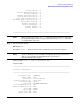
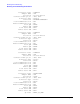
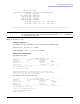

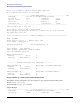
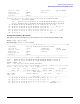
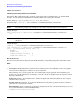
Table Of Contents
- About This Document
- 1 Introduction to Technology
- 2 Hardware Overview
- 3 Installation Planning
- 4 Installing HP Fabric Clustering System
- 5 Administration and Management
- HP-UX Host Administration and Management
- Switch Administration and Management
- CLI Overview
- Using the CLI
- Advanced Switch Setup
- Configuration, Image, and Log Files
- Configuration, Image, and Log File Overview
- File Management
- Listing Configuration, Image, and Log Files
- Viewing Configuration Files
- Viewing Log Files
- Saving Configuration Files
- Saving for System Reboot
- Saving the Backup Configuration
- Specifying the Configuration to Use at
- Saving and Copying Files
- Downloading Files to the System
- Deleting Configuration, Image, and Log Files
- Managing Log Files
- Understanding the Log Format
- Uploading Log Files
- Administering the System
- 6 Monitoring and Troubleshooting
- A Specifications
- B HP 12-Port 4X Fabric Copper Switch Commands
- Show Commands
- show arp ethernet
- show arp IB
- show authentication
- show backplane
- show boot-config
- show card
- show card-inventory
- show clock
- show config
- show fan
- show host
- show ib
- show ib sm configuration
- show ib sm multicast
- show ib sm neighbor
- show ib sm node subnet-prefix
- show ib sm partition
- show ib sm port
- show ib sm service
- show ib sm switch
- show ib-agent channel-adapter
- show ib-agent summary
- show ib-agent switch
- show ib-agent switch linear-frd-info
- show ib-agent switch all mcast-info lid
- show ib-agent switch all node-info
- show ib-agent switch all pkey-info
- show ib-agent switch port-info
- show ib-agent switch sl-vl-map
- show ib-agent switch switch-info
- show interface ib
- show interface ib sm
- show interface ib sm statistics
- show interface mgmt-ethernet
- show interface mgmt-ib
- show interface mgmt-serial
- show ip
- show location
- show logging
- show ntp
- show power-supply
- show running-status
- show sensor
- show snmp
- show system-services
- show terminal
- show trace
- show user
- show version
- IP Commands
- HP Fabric Clustering System Commands
- Administrative Commands
- action
- boot-config
- broadcast
- card
- clock
- configure
- copy
- delete
- dir
- disable
- enable
- exec
- exit
- ftp-server enable
- gateway
- help
- history
- hostname
- install
- interface
- interface mgmt-ethernet
- interface mgmt-ib
- ip
- location
- login
- logging
- logout
- more
- ntp
- ping
- radius-server
- reload
- shutdown
- snmp-server
- telnet
- terminal length
- terminal time-out
- trace
- type
- username
- who
- write
- Show Commands
- C How to Use Windows HyperTerminal
- Glossary

Chapter 6
Monitoring and Troubleshooting
Monitoring and Troubleshooting the HP-UX Host
115
Monitoring and Troubleshooting IPoIB
Troubleshooting IPoIB is accomplished using existing HP network management tools, which are included
with the TOUR and DLPI software bundles (see “Internet Protocol over InfiniBand‘ (IPoIB)” on page 37.) The
following tools and commands are available:
• nettl
• linkloop
nettl Sample Log Output
Sample IB Logs
The following are examples of nettl log output:
------------------------------InfiniBand Subsystem--------------------------@#%
Timestamp : Tue Mar 23 PST 2004 12:06:32.966536
Process ID : 2343 Subsystem : IB
User ID ( UID ) : 0 Log Class : ERROR
Device ID : -1 Path ID : 0
Connection ID : 0 Log Instance : 65535
~~~~~~~~~~~~~~~~~~~~~~~~~~~~~~~~~~~~~~~~~~~~~~~~~~~~~~~~~~~~~~~~~~~~~~~~~~~~
File ib_common_api.c: Line 711:
ib0 : IB SM: port 1 DOWN
Received notification from the adapter that the link went down.
Please ensure that the cable is connected securely to the port and
the device on the other end is functional.
-------------------------------InfiniBand Adapter---------------------------@#%
Timestamp : Tue Mar 23 PST 2004 12:06:32.966545
Process ID : 2343 Subsystem : IB_T
User ID ( UID ) : 0 Log Class : DISASTER
Device ID : -1 Path ID : 0
Connection ID : 0 Log Instance : 65535
~~~~~~~~~~~~~~~~~~~~~~~~~~~~~~~~~~~~~~~~~~~~~~~~~~~~~~~~~~~~~~~~~~~~~~~~~~~~
File ib_common_api.c: Line 712:
0/4/1/0/0/0 : FW download failed: -1
Error accessing FLASH memory
Contact HP Support
-------------------------------InfiniBand Adapter---------------------------@#%
Timestamp : Tue Mar 23 PST 2004 12:06:32.966547
Process ID : 2343 Subsystem : IB_T
User ID ( UID ) : 0 Log Class : ERROR
Device ID : -1 Path ID : 0
Connection ID : 0 Log Instance : 65535
~~~~~~~~~~~~~~~~~~~~~~~~~~~~~~~~~~~~~~~~~~~~~~~~~~~~~~~~~~~~~~~~~~~~~~~~~~~~
File ib_common_api.c: Line 714:
-- ib_tvr attach: existing HCAs are more than 8