
AB291A Fabric Clustering System Support Guide (12-port Switch), April 2004
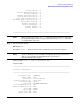
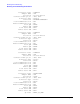
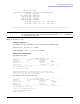

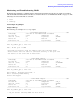
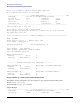
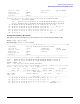
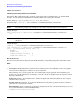
Table Of Contents
- About This Document
- 1 Introduction to Technology
- 2 Hardware Overview
- 3 Installation Planning
- 4 Installing HP Fabric Clustering System
- 5 Administration and Management
- HP-UX Host Administration and Management
- Switch Administration and Management
- CLI Overview
- Using the CLI
- Advanced Switch Setup
- Configuration, Image, and Log Files
- Configuration, Image, and Log File Overview
- File Management
- Listing Configuration, Image, and Log Files
- Viewing Configuration Files
- Viewing Log Files
- Saving Configuration Files
- Saving for System Reboot
- Saving the Backup Configuration
- Specifying the Configuration to Use at
- Saving and Copying Files
- Downloading Files to the System
- Deleting Configuration, Image, and Log Files
- Managing Log Files
- Understanding the Log Format
- Uploading Log Files
- Administering the System
- 6 Monitoring and Troubleshooting
- A Specifications
- B HP 12-Port 4X Fabric Copper Switch Commands
- Show Commands
- show arp ethernet
- show arp IB
- show authentication
- show backplane
- show boot-config
- show card
- show card-inventory
- show clock
- show config
- show fan
- show host
- show ib
- show ib sm configuration
- show ib sm multicast
- show ib sm neighbor
- show ib sm node subnet-prefix
- show ib sm partition
- show ib sm port
- show ib sm service
- show ib sm switch
- show ib-agent channel-adapter
- show ib-agent summary
- show ib-agent switch
- show ib-agent switch linear-frd-info
- show ib-agent switch all mcast-info lid
- show ib-agent switch all node-info
- show ib-agent switch all pkey-info
- show ib-agent switch port-info
- show ib-agent switch sl-vl-map
- show ib-agent switch switch-info
- show interface ib
- show interface ib sm
- show interface ib sm statistics
- show interface mgmt-ethernet
- show interface mgmt-ib
- show interface mgmt-serial
- show ip
- show location
- show logging
- show ntp
- show power-supply
- show running-status
- show sensor
- show snmp
- show system-services
- show terminal
- show trace
- show user
- show version
- IP Commands
- HP Fabric Clustering System Commands
- Administrative Commands
- action
- boot-config
- broadcast
- card
- clock
- configure
- copy
- delete
- dir
- disable
- enable
- exec
- exit
- ftp-server enable
- gateway
- help
- history
- hostname
- install
- interface
- interface mgmt-ethernet
- interface mgmt-ib
- ip
- location
- login
- logging
- logout
- more
- ntp
- ping
- radius-server
- reload
- shutdown
- snmp-server
- telnet
- terminal length
- terminal time-out
- trace
- type
- username
- who
- write
- Show Commands
- C How to Use Windows HyperTerminal
- Glossary

Chapter 6
Monitoring and Troubleshooting
Monitoring and Troubleshooting the HP-UX Host
116
There is an attempt to add more devices than supported
Do not add any more devices to the system
-------------------------------InfiniBand Adapter---------------------------@#%
Timestamp : Tue Mar 23 PST 2004 12:06:32.966548
Process ID : 2343 Subsystem : IB_T
User ID ( UID ) : 0 Log Class : ERROR
Device ID : -1 Path ID : 0
Connection ID : 0 Log Instance : 65535
~~~~~~~~~~~~~~~~~~~~~~~~~~~~~~~~~~~~~~~~~~~~~~~~~~~~~~~~~~~~~~~~~~~~~~~~~~~~
File ib_common_api.c: Line 715:
QP corruption detected..QPN 23 has problems
Potential data corruption in IB library or system ran out of IB resources
Try again with less load
============================= LOG File Summary =============================
Node: iblp0094
HP-UX Version: B.11.23 U Machine Type: ia64
Total number of messages: 4
Messages dropped: 0 Data dropped(bytes): 0
First Message Last Message
Time: 12:06:32.966536Time: 12:06:32.966548
Date: 03/23/04Date: 03/23/04
Message distribution:
Disaster: 1 Error: 3
Warning: 0Informative: 0
~~~~~~~~~~~~~Message distribution by Subsystem~~~~~~~~~~~~~
Subsystem Name: IB Group Name: InfiniBand Subsystem
Disaster: 0 Error: 1
Warning: 0Informative: 0
Subsystem Name: IB_T Group Name: InfiniBand Adapter
Disaster: 1 Error: 2
Warning: 0Informative: 0
Sample IPoIB Logs Viewing Trace Packets in Raw Format
Description: Use this command to view trace packet in “raw” format using the NetTL facility.
Syntax: netfmt [file_name]
Syntax Example: netfmt ipoib.TRC000
Output Example:
^^^^^^^^^^^^^^^^^^^^^^^^^^^^^^^^^^IPoIB Driver^^^^^^^^^^^^^^^^^^^^^^^^^^^^^^@#%
Timestamp : Tue Feb 24 MST 2004 16:03:55.924206
Process ID : [ICS] Subsystem : IPOIB