
AB291A Fabric Clustering System Support Guide (12-port Switch), April 2004

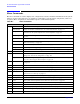
Table Of Contents
- About This Document
- 1 Introduction to Technology
- 2 Hardware Overview
- 3 Installation Planning
- 4 Installing HP Fabric Clustering System
- 5 Administration and Management
- HP-UX Host Administration and Management
- Switch Administration and Management
- CLI Overview
- Using the CLI
- Advanced Switch Setup
- Configuration, Image, and Log Files
- Configuration, Image, and Log File Overview
- File Management
- Listing Configuration, Image, and Log Files
- Viewing Configuration Files
- Viewing Log Files
- Saving Configuration Files
- Saving for System Reboot
- Saving the Backup Configuration
- Specifying the Configuration to Use at
- Saving and Copying Files
- Downloading Files to the System
- Deleting Configuration, Image, and Log Files
- Managing Log Files
- Understanding the Log Format
- Uploading Log Files
- Administering the System
- 6 Monitoring and Troubleshooting
- A Specifications
- B HP 12-Port 4X Fabric Copper Switch Commands
- Show Commands
- show arp ethernet
- show arp IB
- show authentication
- show backplane
- show boot-config
- show card
- show card-inventory
- show clock
- show config
- show fan
- show host
- show ib
- show ib sm configuration
- show ib sm multicast
- show ib sm neighbor
- show ib sm node subnet-prefix
- show ib sm partition
- show ib sm port
- show ib sm service
- show ib sm switch
- show ib-agent channel-adapter
- show ib-agent summary
- show ib-agent switch
- show ib-agent switch linear-frd-info
- show ib-agent switch all mcast-info lid
- show ib-agent switch all node-info
- show ib-agent switch all pkey-info
- show ib-agent switch port-info
- show ib-agent switch sl-vl-map
- show ib-agent switch switch-info
- show interface ib
- show interface ib sm
- show interface ib sm statistics
- show interface mgmt-ethernet
- show interface mgmt-ib
- show interface mgmt-serial
- show ip
- show location
- show logging
- show ntp
- show power-supply
- show running-status
- show sensor
- show snmp
- show system-services
- show terminal
- show trace
- show user
- show version
- IP Commands
- HP Fabric Clustering System Commands
- Administrative Commands
- action
- boot-config
- broadcast
- card
- clock
- configure
- copy
- delete
- dir
- disable
- enable
- exec
- exit
- ftp-server enable
- gateway
- help
- history
- hostname
- install
- interface
- interface mgmt-ethernet
- interface mgmt-ib
- ip
- location
- login
- logging
- logout
- more
- ntp
- ping
- radius-server
- reload
- shutdown
- snmp-server
- telnet
- terminal length
- terminal time-out
- trace
- type
- username
- who
- write
- Show Commands
- C How to Use Windows HyperTerminal
- Glossary

Chapter 6
Monitoring and Troubleshooting
Monitoring and Troubleshooting the Switch
121
• Trace-Level
•Flow
Application The number of applications may change between releases. The numbers assigned to
applications may also change. Check application and module number assignments using CLI help (i.e.,?)
before setting a trace level.
Module "Module" is used to specify what module of code (library), in the selected application tracing should
be configured for.
The number of modules may change between releases. The numbers assigned to modules may also change.
Check module number assignments using CLI help (i.e.,?) before setting trace levels.
Trace-Level "Trace-Level" is used to specify the verbosity of the output. You can specify different levels of
verbosity to control the amount of the tracing information that is generated.
Trace levels are described in the following table:
The information at the specified level and below is shown. For example, if you are only interested in seeing
information that belongs to the VERBOSE category, you can dynamically set the control to VERBOSE. The
trace software will then display information in the VERBOSE, TERSE and VERY_TERSE categories.
Flow "Flow" is used to specify a particular flow in the code. How flows are specified varies, depending on the
module.
• 0x1: This flow shows all the Subnet Management (SM) discovery, assignment routing and routing
processing.
• 0x2: This flow shows all the Subnet Management Agent (SA) related processing.
• 0x4: This flow shows the trap related processing.
• 0x8: This flow shows the redundancy related processing.
Table 6-5 Trace Level Descriptions
Trace Level Description
NO_DISPLAY No tracing information will be generated. This is the default setting to ensure the best
SM performance.
VERY_TERSE Not currently used.
TERSE This level is used to generate the basic flow of MAD packet as it goes through the
Subnet Manager state machine. Verbose description will be made to the success or
failure of the MAD packet. For example, a PathRecord lookup failure will include
description on the cause of the failure (SGID is not found in database, DGID is not
found in database, no component is specified in the component mask…) instead of
simple success or failure code.
VERBOSE This level shows the MAD management class header information.
VERY_VERBOS
E
This level shows the MAD in a decoded format according to HP Fabric Clustering
System Switch decoding algorithm.
SCREAM This level shows the MAD in its raw format.