
AB291A Fabric Clustering System Support Guide (12-port Switch), April 2004

Table Of Contents
- About This Document
- 1 Introduction to Technology
- 2 Hardware Overview
- 3 Installation Planning
- 4 Installing HP Fabric Clustering System
- 5 Administration and Management
- HP-UX Host Administration and Management
- Switch Administration and Management
- CLI Overview
- Using the CLI
- Advanced Switch Setup
- Configuration, Image, and Log Files
- Configuration, Image, and Log File Overview
- File Management
- Listing Configuration, Image, and Log Files
- Viewing Configuration Files
- Viewing Log Files
- Saving Configuration Files
- Saving for System Reboot
- Saving the Backup Configuration
- Specifying the Configuration to Use at
- Saving and Copying Files
- Downloading Files to the System
- Deleting Configuration, Image, and Log Files
- Managing Log Files
- Understanding the Log Format
- Uploading Log Files
- Administering the System
- 6 Monitoring and Troubleshooting
- A Specifications
- B HP 12-Port 4X Fabric Copper Switch Commands
- Show Commands
- show arp ethernet
- show arp IB
- show authentication
- show backplane
- show boot-config
- show card
- show card-inventory
- show clock
- show config
- show fan
- show host
- show ib
- show ib sm configuration
- show ib sm multicast
- show ib sm neighbor
- show ib sm node subnet-prefix
- show ib sm partition
- show ib sm port
- show ib sm service
- show ib sm switch
- show ib-agent channel-adapter
- show ib-agent summary
- show ib-agent switch
- show ib-agent switch linear-frd-info
- show ib-agent switch all mcast-info lid
- show ib-agent switch all node-info
- show ib-agent switch all pkey-info
- show ib-agent switch port-info
- show ib-agent switch sl-vl-map
- show ib-agent switch switch-info
- show interface ib
- show interface ib sm
- show interface ib sm statistics
- show interface mgmt-ethernet
- show interface mgmt-ib
- show interface mgmt-serial
- show ip
- show location
- show logging
- show ntp
- show power-supply
- show running-status
- show sensor
- show snmp
- show system-services
- show terminal
- show trace
- show user
- show version
- IP Commands
- HP Fabric Clustering System Commands
- Administrative Commands
- action
- boot-config
- broadcast
- card
- clock
- configure
- copy
- delete
- dir
- disable
- enable
- exec
- exit
- ftp-server enable
- gateway
- help
- history
- hostname
- install
- interface
- interface mgmt-ethernet
- interface mgmt-ib
- ip
- location
- login
- logging
- logout
- more
- ntp
- ping
- radius-server
- reload
- shutdown
- snmp-server
- telnet
- terminal length
- terminal time-out
- trace
- type
- username
- who
- write
- Show Commands
- C How to Use Windows HyperTerminal
- Glossary
HP 12-Port 4X Fabric Copper Switch Commands
Show Commands
Appendix B
136
show card
Synopsis:
The show card command displays the configuration, status, and SEEPROM (Serial Electrically Erasable and
Programmable Read Only Memory) information for system interface cards.
Syntax:
show card {card# |card#-card# | card#,card#,card#... | all}
This command has the following arguments:
show card Syntax Description
Command Modes:
User-execute and privileged-execute modes.
Privilege Level:
General read-only user.
Usage Guidelines:
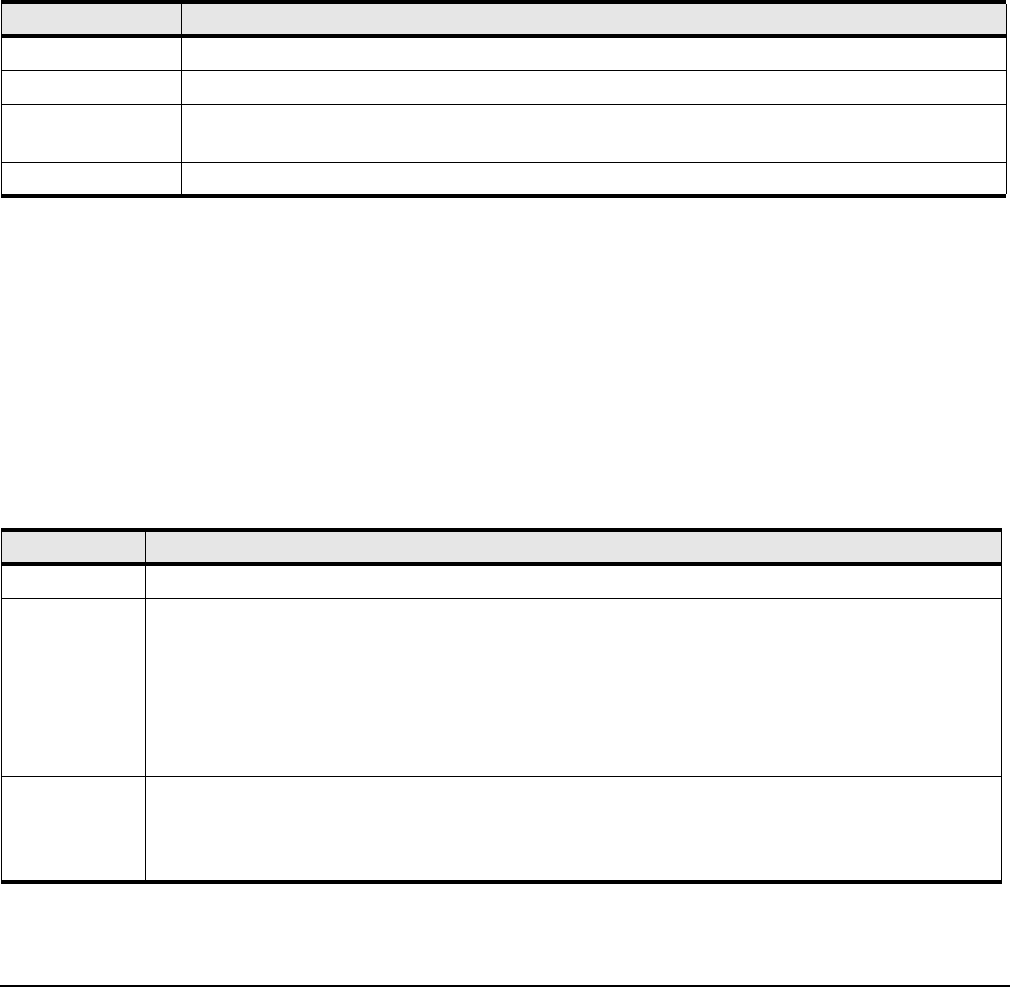
The fields in the show card output are described in the table below.
Table B-4 show card Command Syntax Descriptions
Syntax Description
card# Refers to an individual slot number.
card#-card# Refers to a range of slot numbers. Displayed in the form card#-card#
card#,card#,card#... Refers to a list of slot numbers in the form card#,card#,…Do not add spaces between elements in the
list.
all Displays all cards. The CLI defaults to “add” if you only enter the show card command.
Table B-5 show card Command Field Descriptions
Field Description
slot Slot number the card occupies.
admin type Type of the interface card, as specified by the administrator. The first two letters indicate the general type
of the card such as ib (InfiniBand). This is followed by the number of ports on the card and then the
maximum supported network speed. There are two types that do not follow this convention, controller and
controllerIb12port4x. controller indicates the type of independent controller card found on both sides of
the system chassis. controllerIb12port4x indicates a controller card that piggy-backs onto a 12-port 4X
Fabric Copper Switch cluster connections, where each port connection can support speeds up to 4X.
controllerIb12port4x is found in system configurations.
oper type Actual type of the card, as detected by the controller. If there is any conflict between admin type and oper
type, the system assumes the type specified by oper type is correct and allows you to configure the card
based upon this assumption. If a type mismatch occurs, verify that you are selecting the correct type for the
card in the chassis.