
AB291A Fabric Clustering System Support Guide (12-port Switch), April 2004

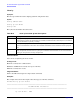
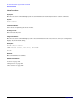
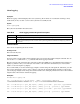
Table Of Contents
- About This Document
- 1 Introduction to Technology
- 2 Hardware Overview
- 3 Installation Planning
- 4 Installing HP Fabric Clustering System
- 5 Administration and Management
- HP-UX Host Administration and Management
- Switch Administration and Management
- CLI Overview
- Using the CLI
- Advanced Switch Setup
- Configuration, Image, and Log Files
- Configuration, Image, and Log File Overview
- File Management
- Listing Configuration, Image, and Log Files
- Viewing Configuration Files
- Viewing Log Files
- Saving Configuration Files
- Saving for System Reboot
- Saving the Backup Configuration
- Specifying the Configuration to Use at
- Saving and Copying Files
- Downloading Files to the System
- Deleting Configuration, Image, and Log Files
- Managing Log Files
- Understanding the Log Format
- Uploading Log Files
- Administering the System
- 6 Monitoring and Troubleshooting
- A Specifications
- B HP 12-Port 4X Fabric Copper Switch Commands
- Show Commands
- show arp ethernet
- show arp IB
- show authentication
- show backplane
- show boot-config
- show card
- show card-inventory
- show clock
- show config
- show fan
- show host
- show ib
- show ib sm configuration
- show ib sm multicast
- show ib sm neighbor
- show ib sm node subnet-prefix
- show ib sm partition
- show ib sm port
- show ib sm service
- show ib sm switch
- show ib-agent channel-adapter
- show ib-agent summary
- show ib-agent switch
- show ib-agent switch linear-frd-info
- show ib-agent switch all mcast-info lid
- show ib-agent switch all node-info
- show ib-agent switch all pkey-info
- show ib-agent switch port-info
- show ib-agent switch sl-vl-map
- show ib-agent switch switch-info
- show interface ib
- show interface ib sm
- show interface ib sm statistics
- show interface mgmt-ethernet
- show interface mgmt-ib
- show interface mgmt-serial
- show ip
- show location
- show logging
- show ntp
- show power-supply
- show running-status
- show sensor
- show snmp
- show system-services
- show terminal
- show trace
- show user
- show version
- IP Commands
- HP Fabric Clustering System Commands
- Administrative Commands
- action
- boot-config
- broadcast
- card
- clock
- configure
- copy
- delete
- dir
- disable
- enable
- exec
- exit
- ftp-server enable
- gateway
- help
- history
- hostname
- install
- interface
- interface mgmt-ethernet
- interface mgmt-ib
- ip
- location
- login
- logging
- logout
- more
- ntp
- ping
- radius-server
- reload
- shutdown
- snmp-server
- telnet
- terminal length
- terminal time-out
- trace
- type
- username
- who
- write
- Show Commands
- C How to Use Windows HyperTerminal
- Glossary
HP 12-Port 4X Fabric Copper Switch Commands
Show Commands
Appendix B
209
show logging
Synopsis:
Theshow logging command displays the active system log file in which are recorded the warnings, errors,
notifications, alerts, etc. that occur once the system is successfully booted.
Syntax:
show logging [end]
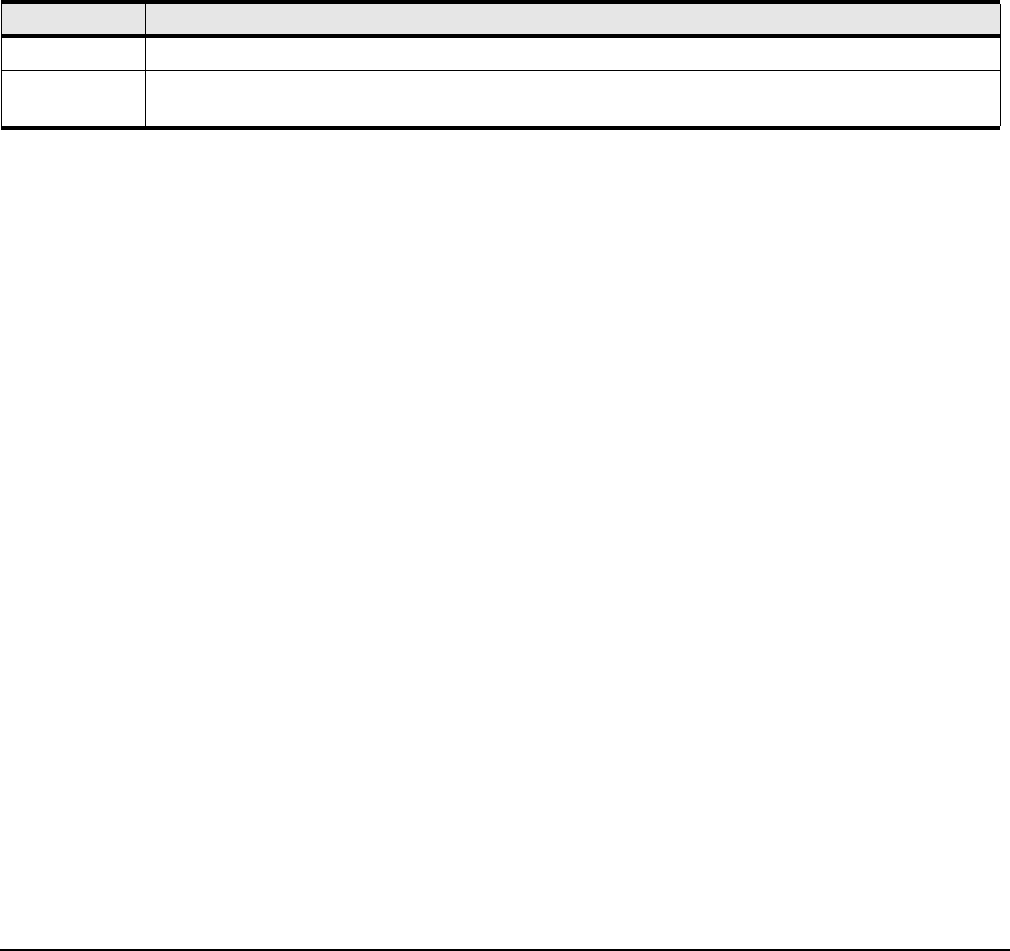
The syntax is described in the table below:
Command Modes:
User-execute and privileged-execute modes.
Privilege Level:
General read-only user.
Usage Guidelines:
You may want to set the number of lines displayed per screen using the terminal length command. You can
also use the more command on ts_log instead of the show logging command.
The show logging end command is the equivalent of using the UNIX tail -f command. The CLI continues to
display log entries as they occur until you enter <Ctrl>-c. No other CLI commands may be entered until
<Ctrl>-c is used to stop the log display.
It is recommended you set the terminal page length to 0 when using the end argument. Otherwise, you will
have to keep pressing the <space> bar to continue each time the maximum display length is reached. Once
you set the page length, do not change the terminal window size. Changing window size restores the terminal
length to that of the window and restarts paging.
Examples:
HP-IB# show logging end
Jan 3 11:09:58 igr-cc ib_sm.x[597]: [INFO]: Successfully add pgid
fe800000000000000005ad0000001199 to mgid ff18a01b00000000000005ad00000002
Jan 3 17:02:56 igr-cc port_mgr.x[535]: [INFO]: port down - port=16/7, type=ib4xFX
Jan 3 17:02:58 igr-cc port_mgr.x[535]: [INFO]: port up - port=16/7, type=ib4xFX
Jan 3 18:21:46 igr-cc port_mgr.x[535]: [INFO]: port down - port=16/2, type=ib4xFX
Jan 3 18:21:48 igr-cc port_mgr.x[535]: [INFO]: port up - port=16/2, type=ib4xFX
Table B-34 show logging Command Syntax Description
Syntax Description
show logging without the end argument displays the entire active log-file.
end Displays approximately the last 10 entries in the system log and then continues to display log entries as
they occur.