
AB291A Fabric Clustering System Support Guide (12-port Switch), April 2004

Table Of Contents
- About This Document
- 1 Introduction to Technology
- 2 Hardware Overview
- 3 Installation Planning
- 4 Installing HP Fabric Clustering System
- 5 Administration and Management
- HP-UX Host Administration and Management
- Switch Administration and Management
- CLI Overview
- Using the CLI
- Advanced Switch Setup
- Configuration, Image, and Log Files
- Configuration, Image, and Log File Overview
- File Management
- Listing Configuration, Image, and Log Files
- Viewing Configuration Files
- Viewing Log Files
- Saving Configuration Files
- Saving for System Reboot
- Saving the Backup Configuration
- Specifying the Configuration to Use at
- Saving and Copying Files
- Downloading Files to the System
- Deleting Configuration, Image, and Log Files
- Managing Log Files
- Understanding the Log Format
- Uploading Log Files
- Administering the System
- 6 Monitoring and Troubleshooting
- A Specifications
- B HP 12-Port 4X Fabric Copper Switch Commands
- Show Commands
- show arp ethernet
- show arp IB
- show authentication
- show backplane
- show boot-config
- show card
- show card-inventory
- show clock
- show config
- show fan
- show host
- show ib
- show ib sm configuration
- show ib sm multicast
- show ib sm neighbor
- show ib sm node subnet-prefix
- show ib sm partition
- show ib sm port
- show ib sm service
- show ib sm switch
- show ib-agent channel-adapter
- show ib-agent summary
- show ib-agent switch
- show ib-agent switch linear-frd-info
- show ib-agent switch all mcast-info lid
- show ib-agent switch all node-info
- show ib-agent switch all pkey-info
- show ib-agent switch port-info
- show ib-agent switch sl-vl-map
- show ib-agent switch switch-info
- show interface ib
- show interface ib sm
- show interface ib sm statistics
- show interface mgmt-ethernet
- show interface mgmt-ib
- show interface mgmt-serial
- show ip
- show location
- show logging
- show ntp
- show power-supply
- show running-status
- show sensor
- show snmp
- show system-services
- show terminal
- show trace
- show user
- show version
- IP Commands
- HP Fabric Clustering System Commands
- Administrative Commands
- action
- boot-config
- broadcast
- card
- clock
- configure
- copy
- delete
- dir
- disable
- enable
- exec
- exit
- ftp-server enable
- gateway
- help
- history
- hostname
- install
- interface
- interface mgmt-ethernet
- interface mgmt-ib
- ip
- location
- login
- logging
- logout
- more
- ntp
- ping
- radius-server
- reload
- shutdown
- snmp-server
- telnet
- terminal length
- terminal time-out
- trace
- type
- username
- who
- write
- Show Commands
- C How to Use Windows HyperTerminal
- Glossary
HP 12-Port 4X Fabric Copper Switch Commands
HP Fabric Clustering System Commands
Appendix B
237
Command Modes:
Global-configuration mode.
Privilege Level:
General read-write user.
Usage Guidelines:
This is an HP Fabric Clustering System Subnet Management Configuration Command.
The subnet manager:
• discovers the subnet topology and dynamically updates it at a specified sweep interval
• configures the LIDs, GID subnet prefixes, and P_Keys for each channel adapter port
• configures the LIDs, subnet prefixes, and forwarding databases for each switch on the subnet
• maintains the endnode and service databases of the subnet, providing a GUID to LID/GID resolution
service as well as a services directory.
One subnet manager is used to administer the fabric. All fabric hosts are on this one subnet. Upon bootup, the
subnet manager image is loaded and ready.
Each node in the fabric has a subnet management agent (SMA) to shuttle communication requests between
the node and the subnet manager. Communication between the subnet manager and the subnet management
agent is done using the common management datagram (MAD) message structure. This structure entails the
passing of subnet management packets (SMP).
There is a limit to the number of MAD packets that may be queued for a single file descriptor. Once the queue
reaches its maximum length (currently set to 8), new packets are dropped. This prevents “livelock” in the
situation where new MADs arrive faster than they can be processed.
The subnet management agent receives and transmits subnet management packets to and from the subnet
manager. The subnet management packets never extend beyond their respective local HP Fabric Clustering
System subnet. Also, SMPs always use Virtual Lane 15 (VL15) and are exclusively addressed to Queue Pair 0
(QP0).
Regarding Partitions:
Partitions are created, and then ports are added to those Partitions to enforce isolation. For more information
regarding creating Partitions, refer to .
NOTE HP recommends that the default partition be used for the cluster.
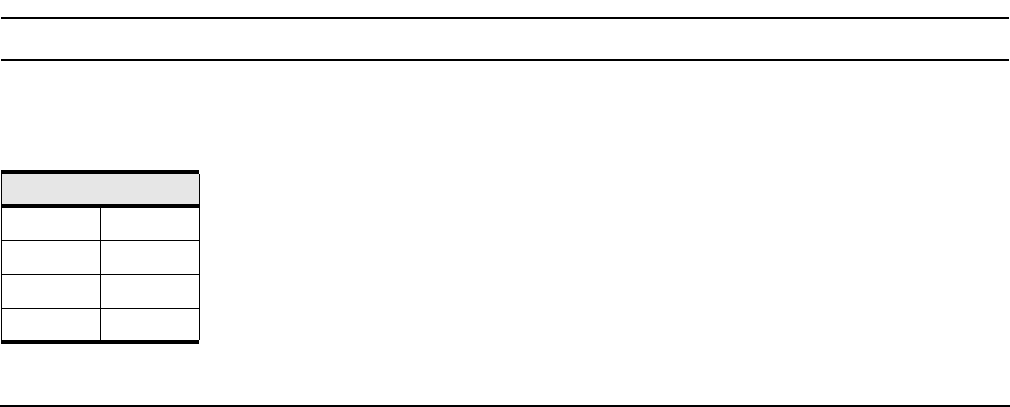
You can choose your own p_key values, or you can simply choose your values from the list in the following
table.”
Table B-47 Acceptable P_Key Values
00:01 00:11
00:02 00:12
00:03 00:13
00:04 00:14