
AB291A Fabric Clustering System Support Guide (12-port Switch), April 2004





Table Of Contents
- About This Document
- 1 Introduction to Technology
- 2 Hardware Overview
- 3 Installation Planning
- 4 Installing HP Fabric Clustering System
- 5 Administration and Management
- HP-UX Host Administration and Management
- Switch Administration and Management
- CLI Overview
- Using the CLI
- Advanced Switch Setup
- Configuration, Image, and Log Files
- Configuration, Image, and Log File Overview
- File Management
- Listing Configuration, Image, and Log Files
- Viewing Configuration Files
- Viewing Log Files
- Saving Configuration Files
- Saving for System Reboot
- Saving the Backup Configuration
- Specifying the Configuration to Use at
- Saving and Copying Files
- Downloading Files to the System
- Deleting Configuration, Image, and Log Files
- Managing Log Files
- Understanding the Log Format
- Uploading Log Files
- Administering the System
- 6 Monitoring and Troubleshooting
- A Specifications
- B HP 12-Port 4X Fabric Copper Switch Commands
- Show Commands
- show arp ethernet
- show arp IB
- show authentication
- show backplane
- show boot-config
- show card
- show card-inventory
- show clock
- show config
- show fan
- show host
- show ib
- show ib sm configuration
- show ib sm multicast
- show ib sm neighbor
- show ib sm node subnet-prefix
- show ib sm partition
- show ib sm port
- show ib sm service
- show ib sm switch
- show ib-agent channel-adapter
- show ib-agent summary
- show ib-agent switch
- show ib-agent switch linear-frd-info
- show ib-agent switch all mcast-info lid
- show ib-agent switch all node-info
- show ib-agent switch all pkey-info
- show ib-agent switch port-info
- show ib-agent switch sl-vl-map
- show ib-agent switch switch-info
- show interface ib
- show interface ib sm
- show interface ib sm statistics
- show interface mgmt-ethernet
- show interface mgmt-ib
- show interface mgmt-serial
- show ip
- show location
- show logging
- show ntp
- show power-supply
- show running-status
- show sensor
- show snmp
- show system-services
- show terminal
- show trace
- show user
- show version
- IP Commands
- HP Fabric Clustering System Commands
- Administrative Commands
- action
- boot-config
- broadcast
- card
- clock
- configure
- copy
- delete
- dir
- disable
- enable
- exec
- exit
- ftp-server enable
- gateway
- help
- history
- hostname
- install
- interface
- interface mgmt-ethernet
- interface mgmt-ib
- ip
- location
- login
- logging
- logout
- more
- ntp
- ping
- radius-server
- reload
- shutdown
- snmp-server
- telnet
- terminal length
- terminal time-out
- trace
- type
- username
- who
- write
- Show Commands
- C How to Use Windows HyperTerminal
- Glossary
HP 12-Port 4X Fabric Copper Switch Commands
HP Fabric Clustering System Commands
Appendix B
243
name
Synopsis:
The name command assigns a name to one or more interface ports. The name can be used to simplify port
identification and indicate its use.
Syntax:
name name
no name
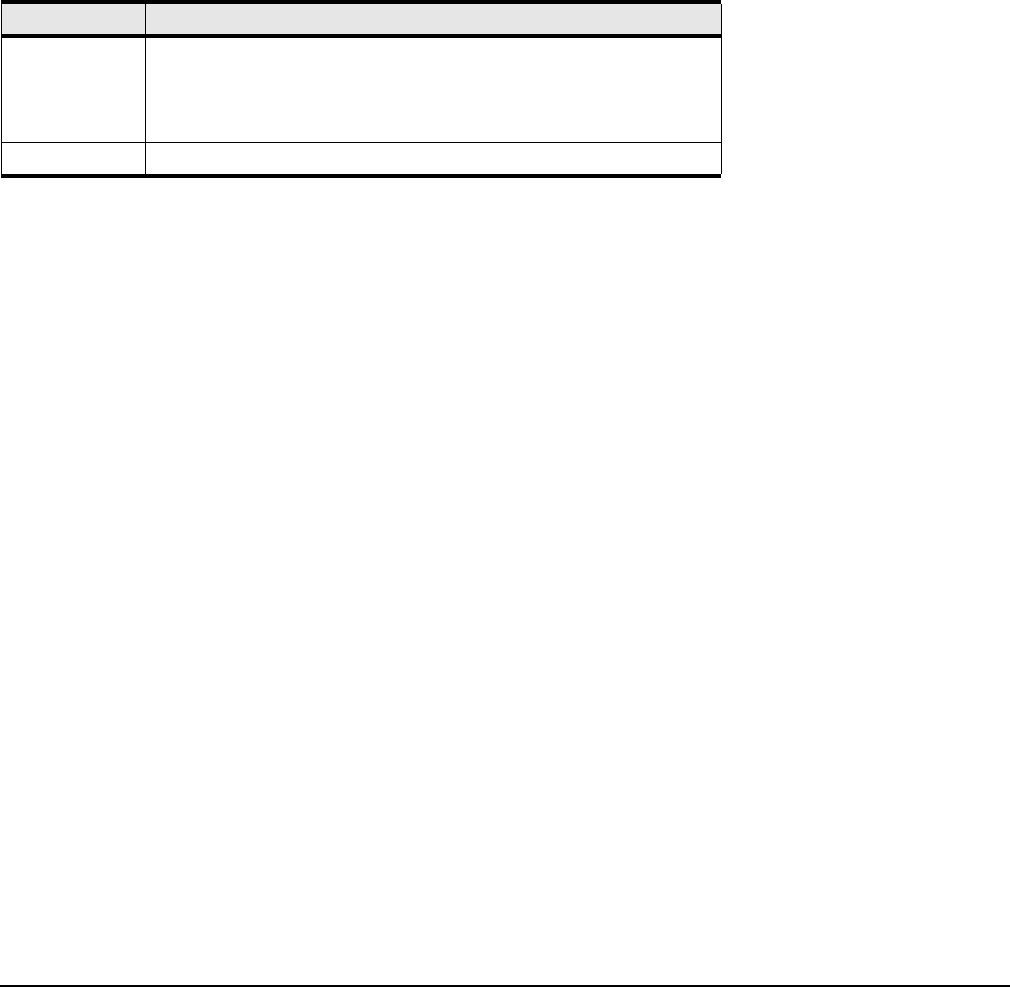
The commands sytax is described in the table below:
Command Modes:
Configuration Interface (config-if) mode.
Privilege Level:
HP Fabric read-write user.
Usage Guidelines:
This command sets the name field of the interface. Refer to the rules for name strings in “Using the
Documentation” on page 67
Examples:
This example assigns the name “InfiniBand Group1-6” to the first 6 ports of InfiniBand card 15.
HP-IB(config-if-ib-15/1-15/6)# name "InfiniBand Group1-6"
Defaults:
The default interface name is card#/port#.
Related Commands:
“show ib sm configuration” on page 149
“show interface ib” on page 194
Table B-52 name Command Syntax Descriptions
Syntax Description
name A text string used to assign the port(s) on the Fabric card. The string is
alphanumeric text up to 20 characters in length. If there are spaces in
the string, enclose the entire string in double-quotes (““). Include the
no keyword to reset this parameter to a null/empty string.
no The no keyword returns the port to its default name.