
AB291A Fabric Clustering System Support Guide (12-port Switch), April 2004
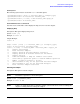
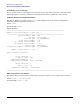
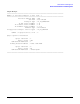
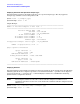
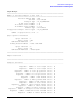

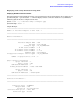

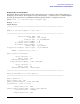

Table Of Contents
- About This Document
- 1 Introduction to Technology
- 2 Hardware Overview
- 3 Installation Planning
- 4 Installing HP Fabric Clustering System
- 5 Administration and Management
- HP-UX Host Administration and Management
- Switch Administration and Management
- CLI Overview
- Using the CLI
- Advanced Switch Setup
- Configuration, Image, and Log Files
- Configuration, Image, and Log File Overview
- File Management
- Listing Configuration, Image, and Log Files
- Viewing Configuration Files
- Viewing Log Files
- Saving Configuration Files
- Saving for System Reboot
- Saving the Backup Configuration
- Specifying the Configuration to Use at
- Saving and Copying Files
- Downloading Files to the System
- Deleting Configuration, Image, and Log Files
- Managing Log Files
- Understanding the Log Format
- Uploading Log Files
- Administering the System
- 6 Monitoring and Troubleshooting
- A Specifications
- B HP 12-Port 4X Fabric Copper Switch Commands
- Show Commands
- show arp ethernet
- show arp IB
- show authentication
- show backplane
- show boot-config
- show card
- show card-inventory
- show clock
- show config
- show fan
- show host
- show ib
- show ib sm configuration
- show ib sm multicast
- show ib sm neighbor
- show ib sm node subnet-prefix
- show ib sm partition
- show ib sm port
- show ib sm service
- show ib sm switch
- show ib-agent channel-adapter
- show ib-agent summary
- show ib-agent switch
- show ib-agent switch linear-frd-info
- show ib-agent switch all mcast-info lid
- show ib-agent switch all node-info
- show ib-agent switch all pkey-info
- show ib-agent switch port-info
- show ib-agent switch sl-vl-map
- show ib-agent switch switch-info
- show interface ib
- show interface ib sm
- show interface ib sm statistics
- show interface mgmt-ethernet
- show interface mgmt-ib
- show interface mgmt-serial
- show ip
- show location
- show logging
- show ntp
- show power-supply
- show running-status
- show sensor
- show snmp
- show system-services
- show terminal
- show trace
- show user
- show version
- IP Commands
- HP Fabric Clustering System Commands
- Administrative Commands
- action
- boot-config
- broadcast
- card
- clock
- configure
- copy
- delete
- dir
- disable
- enable
- exec
- exit
- ftp-server enable
- gateway
- help
- history
- hostname
- install
- interface
- interface mgmt-ethernet
- interface mgmt-ib
- ip
- location
- login
- logging
- logout
- more
- ntp
- ping
- radius-server
- reload
- shutdown
- snmp-server
- telnet
- terminal length
- terminal time-out
- trace
- type
- username
- who
- write
- Show Commands
- C How to Use Windows HyperTerminal
- Glossary

Chapter 5
Administration and Management
HP-UX Host Administration and Management
41
Itutil Syntax
The following syntax must be used with itutil command options:
/opt/rdma/bin/itutil [-srcT] [-i interface_name][-t transport_type]
/opt/rdma/bin/itutil -d trace/notrace interface_name
/opt/rdma/bin/itutil [-n count] -l GID interface_name spigot_id
/opt/rdma/bin/itutil –R interface_name"
Itutil Administrative Commands
Use these basic commands to either display the help screen or reset the adapter.
Displaying Help
Description: This option displays help screen.
Syntax: itutil [-h]
Example: # itutil -h
Output Example:
itutil -h
Usage: itutil [-srcT] [-i "interface_name"][-t "transport_type"]
itutil -d trace/notrace "interface_name"
itutil [-n count] -l "network_addr" "interface_name" "spigot_id"
-h Display this message
-R Reset Interface Adapter
-s Display detailed Interface Adapter Statistics
-c Display detailed IT Reliable Connection Information
-T Display Topology
-d Download firmware or dump the firmware trace buffer
-l Send linkloop equivalent packet to Network Address specified
-n Number of linkloop packets to be sent
-i Show information only for the specified Interface Adapter
-t Show information only for the specified Transport
-r Reset Interface Adapter Statistics
Resetting the Adapter
Description: This option resets the adapter.
NOTE You must be superuser to execute this option.
Syntax: itutil [-R] [interface_name]
Example: # itutil -R ib0
NOTE If there are applications that are using the adapter, you have the choice of force-resetting the
adapter or exiting without resetting the adapter.