
AB291A Fabric Clustering System Support Guide (12-port Switch), April 2004
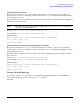

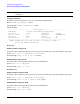
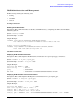
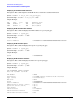
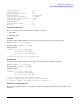
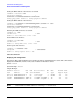
Table Of Contents
- About This Document
- 1 Introduction to Technology
- 2 Hardware Overview
- 3 Installation Planning
- 4 Installing HP Fabric Clustering System
- 5 Administration and Management
- HP-UX Host Administration and Management
- Switch Administration and Management
- CLI Overview
- Using the CLI
- Advanced Switch Setup
- Configuration, Image, and Log Files
- Configuration, Image, and Log File Overview
- File Management
- Listing Configuration, Image, and Log Files
- Viewing Configuration Files
- Viewing Log Files
- Saving Configuration Files
- Saving for System Reboot
- Saving the Backup Configuration
- Specifying the Configuration to Use at
- Saving and Copying Files
- Downloading Files to the System
- Deleting Configuration, Image, and Log Files
- Managing Log Files
- Understanding the Log Format
- Uploading Log Files
- Administering the System
- 6 Monitoring and Troubleshooting
- A Specifications
- B HP 12-Port 4X Fabric Copper Switch Commands
- Show Commands
- show arp ethernet
- show arp IB
- show authentication
- show backplane
- show boot-config
- show card
- show card-inventory
- show clock
- show config
- show fan
- show host
- show ib
- show ib sm configuration
- show ib sm multicast
- show ib sm neighbor
- show ib sm node subnet-prefix
- show ib sm partition
- show ib sm port
- show ib sm service
- show ib sm switch
- show ib-agent channel-adapter
- show ib-agent summary
- show ib-agent switch
- show ib-agent switch linear-frd-info
- show ib-agent switch all mcast-info lid
- show ib-agent switch all node-info
- show ib-agent switch all pkey-info
- show ib-agent switch port-info
- show ib-agent switch sl-vl-map
- show ib-agent switch switch-info
- show interface ib
- show interface ib sm
- show interface ib sm statistics
- show interface mgmt-ethernet
- show interface mgmt-ib
- show interface mgmt-serial
- show ip
- show location
- show logging
- show ntp
- show power-supply
- show running-status
- show sensor
- show snmp
- show system-services
- show terminal
- show trace
- show user
- show version
- IP Commands
- HP Fabric Clustering System Commands
- Administrative Commands
- action
- boot-config
- broadcast
- card
- clock
- configure
- copy
- delete
- dir
- disable
- enable
- exec
- exit
- ftp-server enable
- gateway
- help
- history
- hostname
- install
- interface
- interface mgmt-ethernet
- interface mgmt-ib
- ip
- location
- login
- logging
- logout
- more
- ntp
- ping
- radius-server
- reload
- shutdown
- snmp-server
- telnet
- terminal length
- terminal time-out
- trace
- type
- username
- who
- write
- Show Commands
- C How to Use Windows HyperTerminal
- Glossary

Chapter 5
Administration and Management
HP-UX Host Administration and Management
55
IPoIB Administration and Management
IPoIB is managed using the following tools:
• ifconfig
•lanadmin
•lanscan
ifconfig Command
Enabling the IPoIB Interface
Description: This command enables or disables an IPoIB interface, configuring the link to the HP Fabric
Clustering System.
Syntax: ifconfig lan9000
Syntax Example: lan9000
Output Example:
lan9000: flags=843<UP,BROADCAST,RUNNING,MULTICAST>
inet 100.99.99.53 netmask fffff800 broadcast 100.99.103.255
# 1010: ifconfig lan9000 inet6
lan9000: flags=4800841<UP,RUNNING,MULTICAST,PRIVATE,ONLINK>
inet6 fe80::202:c902:0:77d prefix 10
lanadmin Commands
Displaying IPoIB Interface Information
Description: This command prints IPoIB interface information for a given ipoib_ppa, or interface.
Syntax: lanadmin -x if_info [ipoib_ppa]
Syntax Example: lanadmin -x if_info 9000
Output Example:
Interface PPA Number = 9000
Partition Key = 0xffff
Q Key = 0x0000000b
MAC Addr = 0x0000040cfe8000000000000000000000ca025001
Displaying IPoIB Interface Link-Level Information
Description: This command prints IPoIB port level information for a given ipoib_ppa.
Syntax: lanadmin -x link_info [ipoib_ppa]
Syntax Example: lanadmin -x link_info 9000
Output Example:
Interface PPA Number = 9000
with total (up+down) num of links = 1
Link[0]: HCA = ib0, Port = 1, State = UP
Link[0]: HCA's Hardware Path = 0/5/1/0/0/0
Link[0]: QPN = 0x00040c, GID = 0xfe8000000000000000000000ca025001, LID = 0x000a