
AB291A Fabric Clustering System Support Guide (12-port Switch), April 2004
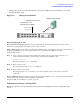
Table Of Contents
- About This Document
- 1 Introduction to Technology
- 2 Hardware Overview
- 3 Installation Planning
- 4 Installing HP Fabric Clustering System
- 5 Administration and Management
- HP-UX Host Administration and Management
- Switch Administration and Management
- CLI Overview
- Using the CLI
- Advanced Switch Setup
- Configuration, Image, and Log Files
- Configuration, Image, and Log File Overview
- File Management
- Listing Configuration, Image, and Log Files
- Viewing Configuration Files
- Viewing Log Files
- Saving Configuration Files
- Saving for System Reboot
- Saving the Backup Configuration
- Specifying the Configuration to Use at
- Saving and Copying Files
- Downloading Files to the System
- Deleting Configuration, Image, and Log Files
- Managing Log Files
- Understanding the Log Format
- Uploading Log Files
- Administering the System
- 6 Monitoring and Troubleshooting
- A Specifications
- B HP 12-Port 4X Fabric Copper Switch Commands
- Show Commands
- show arp ethernet
- show arp IB
- show authentication
- show backplane
- show boot-config
- show card
- show card-inventory
- show clock
- show config
- show fan
- show host
- show ib
- show ib sm configuration
- show ib sm multicast
- show ib sm neighbor
- show ib sm node subnet-prefix
- show ib sm partition
- show ib sm port
- show ib sm service
- show ib sm switch
- show ib-agent channel-adapter
- show ib-agent summary
- show ib-agent switch
- show ib-agent switch linear-frd-info
- show ib-agent switch all mcast-info lid
- show ib-agent switch all node-info
- show ib-agent switch all pkey-info
- show ib-agent switch port-info
- show ib-agent switch sl-vl-map
- show ib-agent switch switch-info
- show interface ib
- show interface ib sm
- show interface ib sm statistics
- show interface mgmt-ethernet
- show interface mgmt-ib
- show interface mgmt-serial
- show ip
- show location
- show logging
- show ntp
- show power-supply
- show running-status
- show sensor
- show snmp
- show system-services
- show terminal
- show trace
- show user
- show version
- IP Commands
- HP Fabric Clustering System Commands
- Administrative Commands
- action
- boot-config
- broadcast
- card
- clock
- configure
- copy
- delete
- dir
- disable
- enable
- exec
- exit
- ftp-server enable
- gateway
- help
- history
- hostname
- install
- interface
- interface mgmt-ethernet
- interface mgmt-ib
- ip
- location
- login
- logging
- logout
- more
- ntp
- ping
- radius-server
- reload
- shutdown
- snmp-server
- telnet
- terminal length
- terminal time-out
- trace
- type
- username
- who
- write
- Show Commands
- C How to Use Windows HyperTerminal
- Glossary
Chapter 5
Administration and Management
Switch Administration and Management
71
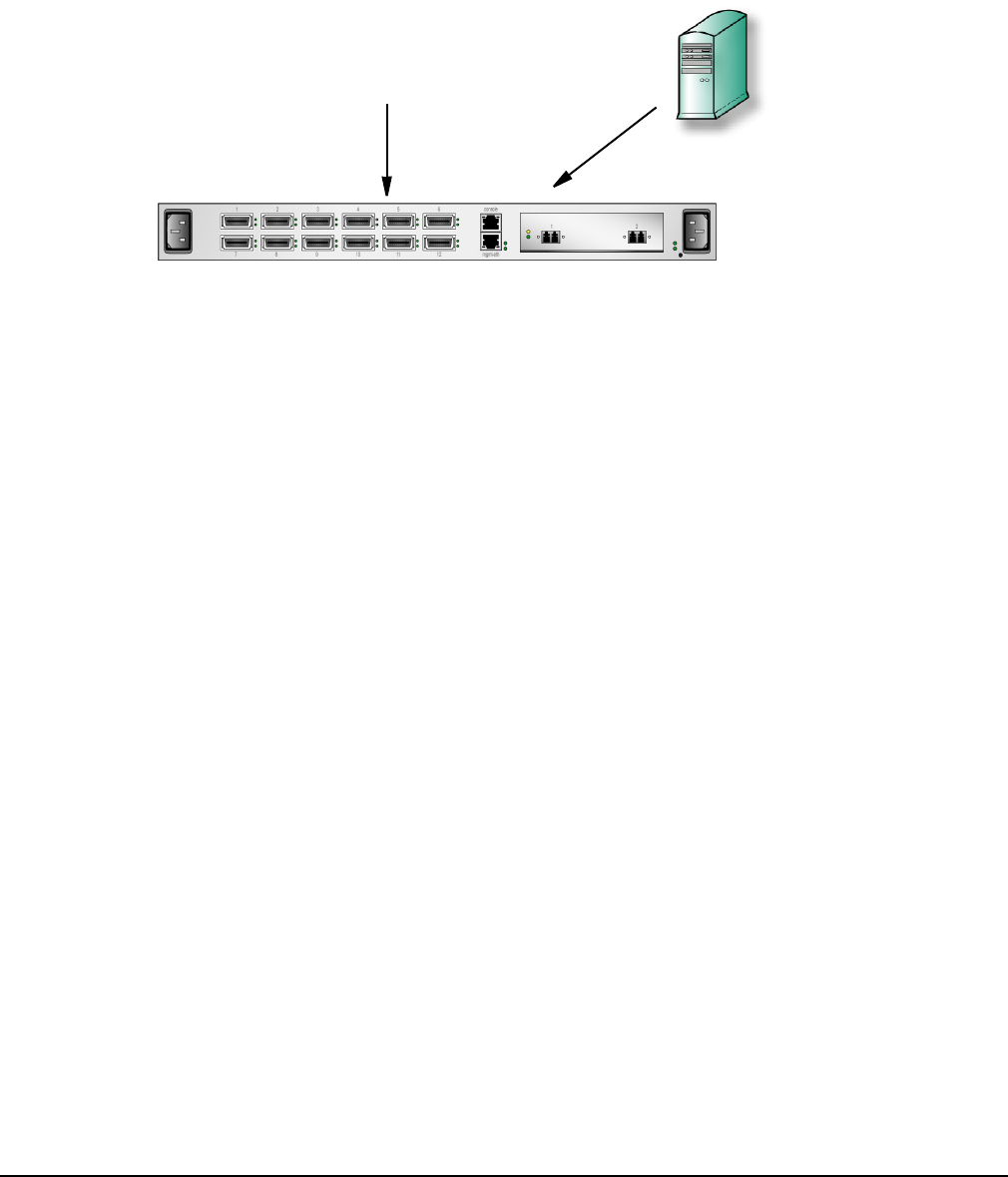
• Manage the system out-of-band through the serial console or Ethernet management port, or in-band
through the Fabric ports.
Figure 5-2 Management Methods
Managing Through the CLI
Direct Serial-Console Connection Refer to the Console Cable kit, which is included with your console cable for
information regarding setting up the physical serial-console connection.
Remote Telnet Login You can Telnet to the Management-Ethernet port on the box from a host on the same network as
the Management-Ethernet port, or from any host with a route to the Management-Ethernet network.
To run the CLI remotely:
Step 1. Open a terminal or terminal emulator window. For example: from the command line, enter the telnet
command with the IP address, or network name, of the Management-Ethernet port.
# telnet 10.0.0.47
The CLI login prompt (Login: ) is displayed.
Step 2. Enter a CLI user name.
The CLI password prompt (Password:) is displayed.
Step 3. Enter the CLI user password.
The prompt changes to HP-IB> to indicate a successful login. The system is now ready to receive CLI
commands.
Remote SSH Login HP Fabric Clustering System Switch OS supports SSH2 for secure, encrypted login to the CLI. SSH
is enabled by default, and does not require additional configuration.
To login via SSH, use an SSH client (e.g. Putty) to port 22.
Configuration, Image, and Log Files
This chapter provides the required information to manage the Configuration, Image, and Log files on the
system.
HP-IB# show card
HP-IB# show backplane
Command Line Interface
SNMP Network Manager
Serial Console or
Telnet over IP
SNMP