
AB291A Fabric Clustering System Support Guide (12-port Switch), April 2004
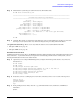
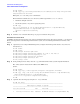
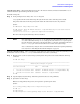
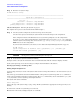
Table Of Contents
- About This Document
- 1 Introduction to Technology
- 2 Hardware Overview
- 3 Installation Planning
- 4 Installing HP Fabric Clustering System
- 5 Administration and Management
- HP-UX Host Administration and Management
- Switch Administration and Management
- CLI Overview
- Using the CLI
- Advanced Switch Setup
- Configuration, Image, and Log Files
- Configuration, Image, and Log File Overview
- File Management
- Listing Configuration, Image, and Log Files
- Viewing Configuration Files
- Viewing Log Files
- Saving Configuration Files
- Saving for System Reboot
- Saving the Backup Configuration
- Specifying the Configuration to Use at
- Saving and Copying Files
- Downloading Files to the System
- Deleting Configuration, Image, and Log Files
- Managing Log Files
- Understanding the Log Format
- Uploading Log Files
- Administering the System
- 6 Monitoring and Troubleshooting
- A Specifications
- B HP 12-Port 4X Fabric Copper Switch Commands
- Show Commands
- show arp ethernet
- show arp IB
- show authentication
- show backplane
- show boot-config
- show card
- show card-inventory
- show clock
- show config
- show fan
- show host
- show ib
- show ib sm configuration
- show ib sm multicast
- show ib sm neighbor
- show ib sm node subnet-prefix
- show ib sm partition
- show ib sm port
- show ib sm service
- show ib sm switch
- show ib-agent channel-adapter
- show ib-agent summary
- show ib-agent switch
- show ib-agent switch linear-frd-info
- show ib-agent switch all mcast-info lid
- show ib-agent switch all node-info
- show ib-agent switch all pkey-info
- show ib-agent switch port-info
- show ib-agent switch sl-vl-map
- show ib-agent switch switch-info
- show interface ib
- show interface ib sm
- show interface ib sm statistics
- show interface mgmt-ethernet
- show interface mgmt-ib
- show interface mgmt-serial
- show ip
- show location
- show logging
- show ntp
- show power-supply
- show running-status
- show sensor
- show snmp
- show system-services
- show terminal
- show trace
- show user
- show version
- IP Commands
- HP Fabric Clustering System Commands
- Administrative Commands
- action
- boot-config
- broadcast
- card
- clock
- configure
- copy
- delete
- dir
- disable
- enable
- exec
- exit
- ftp-server enable
- gateway
- help
- history
- hostname
- install
- interface
- interface mgmt-ethernet
- interface mgmt-ib
- ip
- location
- login
- logging
- logout
- more
- ntp
- ping
- radius-server
- reload
- shutdown
- snmp-server
- telnet
- terminal length
- terminal time-out
- trace
- type
- username
- who
- write
- Show Commands
- C How to Use Windows HyperTerminal
- Glossary

Chapter 5
Administration and Management
Switch Administration and Management
80
HP-IB# more config:sup-config
! Release-1.1.3hp/build023
! Mon Jan 12 19:49:38 2003
enable
config terminal
Viewing Log Files
The contents of the active log-file may be viewed using the show logging and more commands. The show
logging command displays the entire active log-file or log entries as they are being entered in the active
log-file. The more command displays the contents of a specified log file, including the active log-file.
It is recommended you set the terminal page length to 0 when using the end argument. Otherwise, you will
have to keep pressing the
space bar to continue each time the maximum display length is reached. Refer to
“show logging” to set the number of lines displayed as you scroll through the log data.
NOTE: Do not change the window size after you have set the page length; changing the window size would
cause the terminal length to be overwritten by the actual size of the window.
NOTE You cannot view the compressed GNU-zip (.gz) log files that reside on the controller. You must
upload the files to a network host, then unzip them and view them on the host.
To display the tail-end of the active log-file and display new log entries as they occur,
Enter the show command with the logging and end keywords.
HP-IB# show logging end
Feb 24 07:35:45 hp-lt ib_sm.x[668]: [INFO]: Successfully add pgid
fe8000000000000000000000ca001002 to mgid ff12401bffff00000000000000000001, mlid
0xc002
Feb 24 07:35:46 hp-lt ib_sm.x[665]: [INFO]: Configuration caused by multicast
membership change
The show logging command with the end argument locks the terminal window to display log data much like
the UNIX tail -f command. To stop displaying log entries and resume control of the terminal screen, enter
<Ctrl> C. When using the show logging command without the end argument, log text is displayed a page a
time, as set by the terminal length parameter.
Saving Configuration Files
You should save the current configuration as you achieve major configuration milestones so it is recreated
when the chassis reboots. If you do not save the current configuration, all the changes you make during the
current CLI session are lost when the system reboots.
The file used to configure the chassis upon reboot is startup-config in the config file-system. If you want to
restore the configuration to its factory-default, delete the startup-config file.
Saving for System Reboot
In the CLI, to save the current configuration so it is used to reboot the system:
Step 1. Enter the copy and running-config commands:
HP-IB# copy system:running-config config:startup-config