
AB291A Fabric Clustering System Support Guide (12-port Switch), April 2004
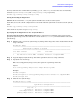

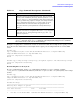
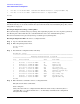
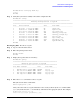
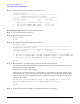

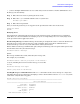
Table Of Contents
- About This Document
- 1 Introduction to Technology
- 2 Hardware Overview
- 3 Installation Planning
- 4 Installing HP Fabric Clustering System
- 5 Administration and Management
- HP-UX Host Administration and Management
- Switch Administration and Management
- CLI Overview
- Using the CLI
- Advanced Switch Setup
- Configuration, Image, and Log Files
- Configuration, Image, and Log File Overview
- File Management
- Listing Configuration, Image, and Log Files
- Viewing Configuration Files
- Viewing Log Files
- Saving Configuration Files
- Saving for System Reboot
- Saving the Backup Configuration
- Specifying the Configuration to Use at
- Saving and Copying Files
- Downloading Files to the System
- Deleting Configuration, Image, and Log Files
- Managing Log Files
- Understanding the Log Format
- Uploading Log Files
- Administering the System
- 6 Monitoring and Troubleshooting
- A Specifications
- B HP 12-Port 4X Fabric Copper Switch Commands
- Show Commands
- show arp ethernet
- show arp IB
- show authentication
- show backplane
- show boot-config
- show card
- show card-inventory
- show clock
- show config
- show fan
- show host
- show ib
- show ib sm configuration
- show ib sm multicast
- show ib sm neighbor
- show ib sm node subnet-prefix
- show ib sm partition
- show ib sm port
- show ib sm service
- show ib sm switch
- show ib-agent channel-adapter
- show ib-agent summary
- show ib-agent switch
- show ib-agent switch linear-frd-info
- show ib-agent switch all mcast-info lid
- show ib-agent switch all node-info
- show ib-agent switch all pkey-info
- show ib-agent switch port-info
- show ib-agent switch sl-vl-map
- show ib-agent switch switch-info
- show interface ib
- show interface ib sm
- show interface ib sm statistics
- show interface mgmt-ethernet
- show interface mgmt-ib
- show interface mgmt-serial
- show ip
- show location
- show logging
- show ntp
- show power-supply
- show running-status
- show sensor
- show snmp
- show system-services
- show terminal
- show trace
- show user
- show version
- IP Commands
- HP Fabric Clustering System Commands
- Administrative Commands
- action
- boot-config
- broadcast
- card
- clock
- configure
- copy
- delete
- dir
- disable
- enable
- exec
- exit
- ftp-server enable
- gateway
- help
- history
- hostname
- install
- interface
- interface mgmt-ethernet
- interface mgmt-ib
- ip
- location
- login
- logging
- logout
- more
- ntp
- ping
- radius-server
- reload
- shutdown
- snmp-server
- telnet
- terminal length
- terminal time-out
- trace
- type
- username
- who
- write
- Show Commands
- C How to Use Windows HyperTerminal
- Glossary

Chapter 5
Administration and Management
Switch Administration and Management
84
1 Mon Nov 17 14:20:09 2003 18911083 HP-AB291A-Release-1.1.3hp-build021.img
1 Mon Nov 17 14:27:51 2003 13082624 Release-1.1.3hp/build021
HP-IB#
NOTE You can only download image and configuration files. Log files cannot be downloaded.
Image files require additional processing. Though they have been copied onto the chassis, image files must be
installed before they can be used to initialize the system. For information about installing image files, refer to
“Image Files” on page 73.
Deleting Configuration, Image, and Log Files
The system manages available storage by rotating and compressing logs files. As a new log file is generated,
the oldest log file is discarded. Also, the controller limits the user to two uninstalled image files.
This section describes how to proactively manage available space by deleting files.
Deleting Configuration Files To remove a configuration file:
Step 1. Log in as the unrestricted user.
Step 2. Enter the privileged-user mode.
HP-IB> enable
HP-IB#
Step 3. Determine the configuration files in memory.
HP-IB# dir config
============================================================================
Existing Configurations on System
============================================================================
slot date-created size file-name
----------------------------------------------------------------------------
1 Mon Dec 9 11:12:29 2002 58 check.cfg
1 Wed Dec 11 19:00:45 2002 38 ftpfile.cfg
1 Fri Nov 15 17:58:26 2002 1792 ip-back.cfg
1 Fri Oct 18 14:36:53 2002 223 ip-config.cfg
1 Mon Dec 9 11:42:18 2002 106 running_config.cfg
1 Thu Dec 5 21:37:27 2002 106 running_config2.cfg
1 Fri Nov 15 13:22:45 2002 7213 srp-all.cfg
1 Fri Nov 15 12:49:07 2002 2561 srp-config.cfg
1 Wed Dec 4 19:52:16 2002 2361 srp-whole.cfg
1 Wed Nov 13 16:48:10 2002 348 system-name.cfg
HP-IB#
Step 4. Enter the delete command to remove a configuration file.
The syntax of the delete command is:
delete config: file
where, file is the name of a configuration file. Enter the name exactly as shown by the dir
command. The config keyword and colon (:) are mandatory and indicate the configuration
file-system. For example: