
AB291A Fabric Clustering System Support Guide (12-port Switch), April 2004
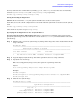

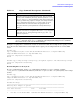
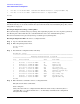
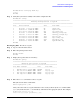
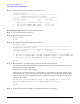

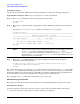
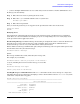
Table Of Contents
- About This Document
- 1 Introduction to Technology
- 2 Hardware Overview
- 3 Installation Planning
- 4 Installing HP Fabric Clustering System
- 5 Administration and Management
- HP-UX Host Administration and Management
- Switch Administration and Management
- CLI Overview
- Using the CLI
- Advanced Switch Setup
- Configuration, Image, and Log Files
- Configuration, Image, and Log File Overview
- File Management
- Listing Configuration, Image, and Log Files
- Viewing Configuration Files
- Viewing Log Files
- Saving Configuration Files
- Saving for System Reboot
- Saving the Backup Configuration
- Specifying the Configuration to Use at
- Saving and Copying Files
- Downloading Files to the System
- Deleting Configuration, Image, and Log Files
- Managing Log Files
- Understanding the Log Format
- Uploading Log Files
- Administering the System
- 6 Monitoring and Troubleshooting
- A Specifications
- B HP 12-Port 4X Fabric Copper Switch Commands
- Show Commands
- show arp ethernet
- show arp IB
- show authentication
- show backplane
- show boot-config
- show card
- show card-inventory
- show clock
- show config
- show fan
- show host
- show ib
- show ib sm configuration
- show ib sm multicast
- show ib sm neighbor
- show ib sm node subnet-prefix
- show ib sm partition
- show ib sm port
- show ib sm service
- show ib sm switch
- show ib-agent channel-adapter
- show ib-agent summary
- show ib-agent switch
- show ib-agent switch linear-frd-info
- show ib-agent switch all mcast-info lid
- show ib-agent switch all node-info
- show ib-agent switch all pkey-info
- show ib-agent switch port-info
- show ib-agent switch sl-vl-map
- show ib-agent switch switch-info
- show interface ib
- show interface ib sm
- show interface ib sm statistics
- show interface mgmt-ethernet
- show interface mgmt-ib
- show interface mgmt-serial
- show ip
- show location
- show logging
- show ntp
- show power-supply
- show running-status
- show sensor
- show snmp
- show system-services
- show terminal
- show trace
- show user
- show version
- IP Commands
- HP Fabric Clustering System Commands
- Administrative Commands
- action
- boot-config
- broadcast
- card
- clock
- configure
- copy
- delete
- dir
- disable
- enable
- exec
- exit
- ftp-server enable
- gateway
- help
- history
- hostname
- install
- interface
- interface mgmt-ethernet
- interface mgmt-ib
- ip
- location
- login
- logging
- logout
- more
- ntp
- ping
- radius-server
- reload
- shutdown
- snmp-server
- telnet
- terminal length
- terminal time-out
- trace
- type
- username
- who
- write
- Show Commands
- C How to Use Windows HyperTerminal
- Glossary

Chapter 5
Administration and Management
Switch Administration and Management
85
HP-IB# delete config:ip-back.cfg
******
HP-IB#
Step 5. Verify that you had successfully removed the configuration file.
HP-IB# dir config
========================================================================
Existing Configurations on System
============================================================================
slot date-created size file-name
----------------------------------------------------------------------------
1 Mon Dec 9 11:12:29 2002 58 check.cfg
1 Wed Dec 11 19:00:45 2002 38 ftpfile.cfg
1 Fri Oct 18 14:36:53 2002 223 ip-config.cfg
1 Mon Dec 9 11:42:18 2002 106 running_config.cfg
1 Thu Dec 5 21:37:27 2002 106 running_config2.cfg
1 Fri Nov 15 13:22:45 2002 7213 srp-all.cfg
1 Fri Nov 15 12:49:07 2002 2561 srp-config.cfg
1 Wed Dec 4 19:52:16 2002 2361 srp-whole.cfg
1 Wed Nov 13 16:48:10 2002 348 system-name.cfg
HP-IB#
Deleting Log Files To remove a log file
Step 1. Log in as the unrestricted user.
Step 2. Enter the privileged-user mode.
HP-IB> enable
HP-IB#
Step 3. Display the log files that are in memory.
HP-IB# dir syslog
========================================================
Existing Syslog-files on System
========================================================
slot date-created size file-name
--------------------------------------------------------
1 Wed Nov 26 11:19:25 2003 849964 ts_log
1 Tue Oct 21 16:00:03 2003 50373 ts_log.1.gz
1 Tue Sep 23 13:00:04 2003 54514 ts_log.2.gz
1 Fri Sep 12 17:00:03 2003 45265 ts_log.3.gz
Step 4. Enter the delete command to remove a log file.
The syntax of the delete command is:
delete syslog:file | dir
where, file is the name of a log file. Enter the name exactly as shown by the dir command. The
syslog keyword and colon (:) are mandatory and indicate the logging file-system. For example:
HP-IB# delete syslog:ts_log.3.gz
Delete file ts_log.3.gz? [yes(default) | yes]