
AB291A Fabric Clustering System Support Guide (12-port Switch), April 2004

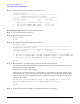

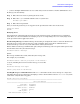
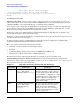
Table Of Contents
- About This Document
- 1 Introduction to Technology
- 2 Hardware Overview
- 3 Installation Planning
- 4 Installing HP Fabric Clustering System
- 5 Administration and Management
- HP-UX Host Administration and Management
- Switch Administration and Management
- CLI Overview
- Using the CLI
- Advanced Switch Setup
- Configuration, Image, and Log Files
- Configuration, Image, and Log File Overview
- File Management
- Listing Configuration, Image, and Log Files
- Viewing Configuration Files
- Viewing Log Files
- Saving Configuration Files
- Saving for System Reboot
- Saving the Backup Configuration
- Specifying the Configuration to Use at
- Saving and Copying Files
- Downloading Files to the System
- Deleting Configuration, Image, and Log Files
- Managing Log Files
- Understanding the Log Format
- Uploading Log Files
- Administering the System
- 6 Monitoring and Troubleshooting
- A Specifications
- B HP 12-Port 4X Fabric Copper Switch Commands
- Show Commands
- show arp ethernet
- show arp IB
- show authentication
- show backplane
- show boot-config
- show card
- show card-inventory
- show clock
- show config
- show fan
- show host
- show ib
- show ib sm configuration
- show ib sm multicast
- show ib sm neighbor
- show ib sm node subnet-prefix
- show ib sm partition
- show ib sm port
- show ib sm service
- show ib sm switch
- show ib-agent channel-adapter
- show ib-agent summary
- show ib-agent switch
- show ib-agent switch linear-frd-info
- show ib-agent switch all mcast-info lid
- show ib-agent switch all node-info
- show ib-agent switch all pkey-info
- show ib-agent switch port-info
- show ib-agent switch sl-vl-map
- show ib-agent switch switch-info
- show interface ib
- show interface ib sm
- show interface ib sm statistics
- show interface mgmt-ethernet
- show interface mgmt-ib
- show interface mgmt-serial
- show ip
- show location
- show logging
- show ntp
- show power-supply
- show running-status
- show sensor
- show snmp
- show system-services
- show terminal
- show trace
- show user
- show version
- IP Commands
- HP Fabric Clustering System Commands
- Administrative Commands
- action
- boot-config
- broadcast
- card
- clock
- configure
- copy
- delete
- dir
- disable
- enable
- exec
- exit
- ftp-server enable
- gateway
- help
- history
- hostname
- install
- interface
- interface mgmt-ethernet
- interface mgmt-ib
- ip
- location
- login
- logging
- logout
- more
- ntp
- ping
- radius-server
- reload
- shutdown
- snmp-server
- telnet
- terminal length
- terminal time-out
- trace
- type
- username
- who
- write
- Show Commands
- C How to Use Windows HyperTerminal
- Glossary

Chapter 5
Administration and Management
Switch Administration and Management
87
HP-IB# dir image
============================================================================
Existing Boot-Images on System
============================================================================
slot date-created size file-name
----------------------------------------------------------------------------
1 Mon Nov 17 14:20:09 2003 18911083 HP-AB291A-Release-1.1.3hp-build021.img
1 Mon Nov 17 14:27:51 2003 13082624 Release-1.1.3hp/build021
HP-IB#
Managing Log Files
HP Fabric Clustering System Switch devices log essential information to facilitate system audits and
troubleshooting. These log files should be checked to locate performance bottlenecks and error conditions.
Logs are saved on flash memory, and are rotated based on user-definable settings Logs can be uploaded via
FTP to an FTP server for archiving off-box viewing.
Event Message Types There are five types of event messages stored in the logs:
• CONFIG - Used to log user configuration changes.
• INFO - Used to log informational events. No user action is needed. (e.g., card insertion/removal, port
up/down).
• WARN - Used to log warning conditions. An abnormal condition was detected. The condition may have
been self-corrected by the system or some user action may be needed.
• ERROR - Used to log an error condition. An error condition was detected. Some user action is required.
(e.g., the system is low in memory - the user may have to disable some features).
• FATAL - Used to log fatal condition. A fatal error condition was detected. There is nothing the user can do
to fix the problem (except rebooting the device).
Understanding the Log Format
HP Fabric Clustering System Switch devices use the following log format.
A B C D E F
+--------------+------+-------------+----+--------+---------------------+
Aug 21 16:57:17 host chassis_mgr.x[4614]:[INFO]: card 4 booting-up
Aug 21 16:59:17 host chassis_mgr.x[4614]:[WARN]: resetting card
Aug 21 16:59:17 host chassis_mgr.x[4614]:[FATAL]: port not responding
A: Timestamp
B: Name of card that generated the message
C: Application that generated the message
D: The process-id of the application
E: The type of event message
F: The message text