
AD386A PCIe 10 Gigabit Ethernet Card Overview


Product Overview
Network Card Configuration Worksheet
11
Network Card Configuration Worksheet
Fill out one worksheet for each network card you are installing.
Note 1: To configure values permanently, edit the configuration files. Using lanadmin will not preserve your settings across
reboots.
Note 2: The valid MTU range for the icxgbe driver on both HP-UX 11i v3 and HP-UX 11i v2 is 257 - 1500 for normal frames
and 1501 - 9000 for Jumbo Frames.
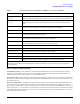
Table 3 Network Card Configuration Worksheet
Data Type
Required/
Optional
Default
How to Configure (see
Note 1)
Example
You r
System
Internet Address Required 0.0.0.0 Nwmgr (SAM) or
ifconfig or edit
/etc/rc.config.d/
netconf
196.6.20.2
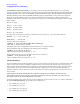
Subnet mask Required if
using
subnetting
Subnet mask not
used
Nwmgr (SAM) or
ifconfig or edit
/etc/rc.config.d/
netconf
255.255.248.0
Station address Built-in but
can be
optionally
changed
As shown on card Nwmgr (SAM) or edit
HP_ICXGBE_STATION
_ADDRESS parameter in
/etc/rc.config.d/
hpicxgbeconf or
temporarily: lanadmin
-A
0x0060b0c4012f
Host name alias
for this network
interface (card)
Required if
the system is
connected to
more than 1
network
None Nwmgr (SAM) or edit
/etc/hosts
host1
MTU (Maximum
Transmission
Unit): Jumbo
Frames
Optional 1500 bytes Nwmgr (SAM) or edit
HP_ICXGBE_MTU
parameter in
/etc/rc.config.d/
hpicxgbeconf or
temporarily: lanadmin
-M
lanadmin -M 9000 ppa#
(see Note 2 below)
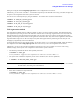
Transmit/
Receive flow
control
Optional On Nwmgr( SAM) or edit
/etc/rc.config.d/
hpicxgbeconf or
temporarily: lanadmin
-X
lanadmin -X rx_fctrl
off
lanadmin -X
rx_fctrl_on
lanadmin -X
tx_fctrl_off
lanadmin -X tx_fctrl_on