
HyperFabric Configuration Guidelines






HyperFabric Configuration Guidelines
Hyper Messaging Protocol (HMP)
33
HMP Supported Configurations
Multiple HMP HyperFabric configurations are supported to match the
performance, cost and scaling requirements of each installation.
In the section “Configuration Parameters” on page 27, the maximum
limits for HMP enabled HyperFabric hardware configurations were
outlined. In this section, the HMP enabled HyperFabric configurations
that HP supports will be detailed. These recommended configurations
offer an optimal mix of performance, availability and practicality for a
variety of operating environments.
There are many variables that can impact HyperFabric performance. If
you are considering a configuration that is beyond the scope of the
following HP supported configurations, contact your HP representative.
Point-to-Point
You can interconnect large servers like the HP Superdome to run Oracle
RAC 9i and enterprise resource planning applications. These
applications are typically consolidated on large servers.
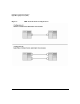
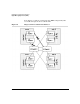
Point-to-point connections between servers support the performance
benefits of HMP without investing in HyperFabric switches. This is a
good solution in small configurations where the benefits of a switched
HyperFabric cluster might not be required (see configuration A in
Figure 6).
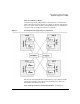
If an HMP application is running over HyperFabric and another node or
adapter is added to either of the nodes, it is necessary to also add a
HyperFabric switch to the cluster (see configuration B in Figure 6).