
10GigEthr-02 (iexgbe) B.11.31.1109 Ethernet Driver Release Notes

1 10GigEthr-02 overview
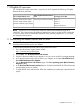
The 10GigEthr-02 bundle contains the iexgbe driver, which supports the following 10 Gigabit
Ethernet products and LOMs:
HP Integrity Server LOM
PCIe 10 Gigabit Mezzanine Ethernet
CardsPCIe 10 Gigabit Ethernet Cards
BL860c i2NC532m (part number 467799-B21)AM225A 10GbE-SR (fibre) adapter
BL870c i2AM232A 10GbE-LR (fibre) adapter
BL890c i2AM233A 10GbE-CR (copper) adapter
Integrity Superdome 2
NOTE: The HP-UX ioscan utility shows AM225A, AM232A and AM233A cards all as
“AM225A”. This is because the only difference between the cards is the type of SFP module that
is used. Since the cards are functionally equivalent at the operating system level, ioscan does
not distinguish between them.
1.1 Downloading the adapter firmware and EFI driver
IMPORTANT: To ensure full functionality, you must install the latest adapter firmware and Extensible
Firmware Interface (EFI) driver for your adapter.
To download the adapter firmware and EFI driver, follow these steps:
1. Go to the HP Business Support Center website:
http://www.hp.com/go/bizsupport
2. Under Tasks, click Download drivers and software.
3. Search for the part number of your adapter, or for your server model; for example, NC532m.
4. In the product search results, click the link for your adapter; for example, HP NC532m Dual
Port 10GbE Multifunction BL-c Adapter.
5. On the Download drivers and software page, click Cross operating system (BIOS, Firmware,
Diagnostics, etc.).
6. In the EFI (extensible firmware interface) section, click the Download link for EFI and Firmware
for HP Integrity servers (or similar).
7. To install the EFI driver and firmware, follow the installation procedure that is provided in the
zip file.
1 10GigEthr-02 overview 3