
10GigEthr-02 (iexgbe) B.11.31.1205 Ethernet Driver Release Notes

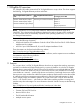
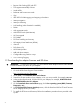

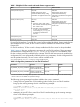
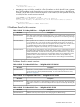
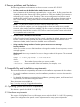
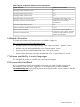

Table 7 System component minimum version requirements
Minimum version requiredSystem component
BHP Integrity BL860c hardware revision
4.21HP Integrity BL860c system firmware
4.21HP Integrity BL870c system firmware
Use the latest system firmware. For
information on how to obtain and install
HP Integrity BL8x0c i2 system firmware
HP Integrity Superdome 2 system firmware
system firmware, see the server
documentation.
3.0HP Onboard Administrator firmware
5.2.27NC532m, AM225A, AM232A, AM233A EFI driver
Use the latest version available. For
information on how to obtain and install
HP Virtual Connect firmware
Interconnect module firmware
interconnect module firmware, see the
product's documentation.
6 Related information
The latest documentation for Ethernet cards is available in English at:
http://www.hp.com/go/10-gigabit-ethernet-docs
• Installation guides are listed alphabetically in the “Setup and install — general” section.
• Release notes are listed alphabetically in the “Getting started” section.
• Support guides are listed alphabetically in the “User guide” section.
• Support Matrix documents are listed alphabetically in the “General reference” section.
7 Software availability in native languages
The 10GigEthr-02 product is available only in the English language.
8 Documentation feedback
HP is committed to providing documentation that meets your needs. To help us improve the
documentation, send any errors, suggestions, or comments to Documentation Feedback
(docsfeedback@hp.com). Include the document title and part number, version number, or the URL
when submitting your feedback.
6 Related information 9