
FibrChanl-01 (fcd) B.11.31.1311 Fibre Channel Mass Storage Driver for HP-UX 11i v3 Release Notes

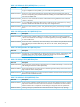
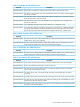
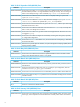
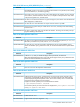
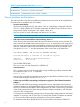
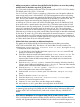

Table 21 HP-UX September 2007 Fixes (continued)
DescriptionDefect ID
Avoid use of /tmp file for driver dumpsSR: 8606477715
Modify fcd dump driver to support > 2TB LUNsSR: 8606466124
Known problems and limitations
This section provides a list of known problems and limitations as known to HP at time of publication.
If workarounds are available, they are included.
• Incorrect speed display
With vPars and Integrity VM 6.2 and earlier, if vPar or a VM Guest is configured with NPIV
VFCs on a 16Gb adapter, the FC Provider enumeration of NPIV VFC ports within the vPar or
VM guest will display “MaxSpeed” and “Speed” values as 0.
This issue is seen on vPars and Integrity VM versions 6.2 or earlier.
NOTE: This issue will be corrected in a future HP-UX vPars and Integrity VM release.
• CRA report shows internal failures reported during “olrad –r”
When existing cards which have been claimed in last boot are moved into the powered off
state, and are later added to the system using the olrad -A command, the OL* script of fcd
does not create special device files corresponding to the fcd cards present under the PCI slot.
Failure to create these special device files leads to the following error being reported in the
CRA phase of olrad -r, and the replacement of the current card on the system fails.
—
CRA REPORT SUMMARY: CRA encountered INTERNAL FAILURES.
Detailed CRA report is available in /var/adm/cra.log file.
CRA Error : ERROR occurred during analysis
Target slot : 11-0-2-0-0-4
--
See CR QXCR1001233122.
This issue is seen only with Superdome 2 (CB900s i4).
Corrective action:
This is a known issue and can be resolved by issuing the following insf(1M) command after
the completion of the olrad -A command:
#insf -e -C fc
Executing this command will create the necessary device special files which the fcd OL* script
did not create during the execution of olrad -A.
• Private Loop and Public Loop topology configuration support for Fibre Channel mezzanine
adapters
Private Loop and Public Loop topology configurations are not supported for Fibre Channel
mezzanine adapters on HP Integrity Blade servers in combination with the Fibre Channel (FC)
Pass Thru I/O Interconnect modules. These configurations can result in servers losing connection
to the Storage Area Network (SAN) during mezzanine adapter initialization, and SAN boot
may fail in such configurations.
It is strongly recommended that customers not use loop topology configurations for mezzanine
adapters in conjunction with FC Pass Thru I/O interconnect modules. Customers are advised
to use Point-to-Point Fabric topology configuration with mezzanine adapters.
For additional information, please refer to HP Customer Advisory Document c02985353.
8