
HP PCIe 2 port 10Gb Ethernet-SR, LR, and CR Adapter Installation Guide, Edition 2
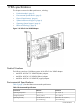
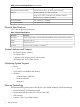
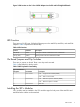

Figure 2 LED Location on the 2–Port 10GbE Adapter Low-Profile and Full Height Bulkheads
LED Function
There are two (2) LED's per 10Gigabit Ethernet port on the AM225A, AM232A, and AM233A
adapters. Table 4 explains their functionality:
Table 4 LED Functions
DescriptionLED ColorFunction
Solid green indicates 10Gb Ethernet Link is establishedGreenLink (LINK)
Blinking Amber indicates 10Gb Ethernet trafficAmberActivity (ACT)
On Board Jumpers and Dip Switches
There are no jumpers on board. There is one dip switch mounted.
Table 5 offers details for the dip switch:
Table 5 SW1 Dip Switch Functionality
DescriptionPin Number
Dip Switch Reference
Designator
OFF — Single Function Enable (default)Pins 1 and 61
ON — Multi Function Enable
OFF — RMII Clock Speed is 50MHz (default)Pins 2 and 52
ON — RMII Clock Speed is 25MHz
ReservedPins 3 and 43
Installing the SFP+ Modules
SFP+ modules must be installed in the SFP+ module cages for both ports of the AM225A and
AM232A before cables can be attached.
LED Function 7