
HP-UX and Windows OS Installation Guide for HP NC532m Dual Port Flex-10 10GbE Multifunction BL-c Adapter

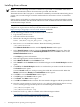
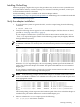
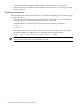

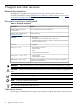

If reported, HP-UX detected the adapter but the iexgbe driver is not recognized.
4. If the correct driver is installed and the adapter is not listed in the ioscan output, contact
HP for assistance.
Verifying connectivity
Once the HP Ethernet software and hardware are installed and running, use the following steps
to verify connectivity:
1. Check the state of all Ethernet hardware and interfaces. Enter the ioscan command and
verify the Hardware State and the hw Interface state are CLAIMED.
If the Ethernet device file has not been created, enter the following commands:
# insf -e
# ioscan -f
2. Verify link-level connectivity with a remote system on the network you have attached to
the Ethernet adapter by using the nwmgr command in the following format.
nwmgr --diag -A dest=destination_MAC_address -c lanppa
NOTE: When you use nwmgr --diag to check connectivity, ensure that the remote system
is on the same subnet and is an HP-UX-based system.
8 Installing the HP-UX operating system components