
Virtual Connect and HP A-Series switches (A5820) IRF Integration Guide

17
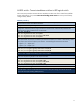
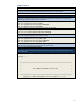
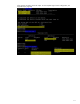
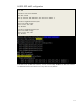
A5820: LACP
The Bridge-Aggregation interface is equal to the port channel interface on Cisco to bundle multiple
physical links.
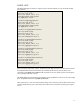
interface Bridge-Aggregation2
port link-type trunk
port trunk permit vlan 1 to 2
link-aggregation mode dynamic
stp edged-port enable
#
interface Bridge-Aggregation3
port link-type trunk
port trunk permit vlan 1 to 2
link-aggregation mode dynamic
stp edged-port enable
#
interface Ten-GigabitEthernet1/0/1
port link-mode bridge
port link-type trunk
port trunk permit vlan 1 to 2
port link-aggregation group 2
#
interface Ten-GigabitEthernet1/0/2
port link-mode bridge
port link-type trunk
port trunk permit vlan 1 to 2
port link-aggregation group 3
#
interface Ten-GigabitEthernet2/0/25
port link-mode bridge
port link-type trunk
port trunk permit vlan 1 to 2
port link-aggregation group 2
#
interface Ten-GigabitEthernet2/0/26
port link-mode bridge
port link-type trunk
port trunk permit vlan 1 to 2
port link-aggregation group 3
#
When connecting with Virtual Connect, the Spanning Tree edge ports (Cisco PortFast) feature should
be enabled because Virtual Connect does not communicate STP with any network device. The
command is stp edged-port enable under the interface. This can speed up network convergence
time, especially when links come up.
The BPDU (Bridge Protocol Data Unit) guard feature can be enabled for more security to protect edge
ports. The global command is stp bpdu-protection.
These practices are in line with networking best design when connecting with host NICs. Networking
switches should treat any ports connecting with Virtual Connect as the ports connecting with regular
servers.