
Virtual Connect and HP A-Series switches (A5820) IRF Integration Guide

8
Physical
IRF port
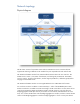
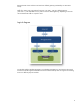
Physical IRF ports are physical (copper or fiber) ports bound to an IRF port. They
perform the following functions:
Connect IRF member switches
Forward IRF protocol packets and data packets between IRF member switches
Priority
Member priority determines the role of a member during a role election process. A
member with a higher priority is more likely to be a master. The priority of a switch
defaults to 1.
Member ID
An IRF virtual device uses member IDs to uniquely identify its members. Configuration
Information such as port (physical or logical) numbers, port configurations, and
member priorities relate to member IDs.
Domain ID
Each switch belongs to one IRF domain. By default, the domain ID is 0. Although
switches with different domain IDs can form an IRF virtual device, HP recommends
assigning the same domain ID to the members of the same IRF virtual device.
Otherwise, the LACP MAD detection cannot function properly.
MAD (Multi-Active Detection)
MAD
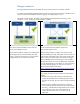
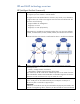
MAD protects IRF link failure when both switches with the same configuration meet the
criteria for master switch. In this case, MAD shuts down one of the switches according to
role election. The switch with a higher priority becomes the master, and then the local
interfaces for switch 2 are shut down.
When an IRF link is down as a result of MAD, switch 1 continues to run. Switch 2 inactivates
all local interfaces.
MAD detects multiple active IRFs using one of three methods:
LACP
BFD
ARP
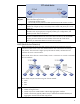
LACP
MAD
Most widely deployed
Fastest convergence time
Needs only one CLI “MAD enable” under bridge aggregation interface
Needs a third switch (Typically HPN A-series) to understand extended LACPDU (Link
Aggregation Control Protocol Data Unit) packets