
- Hewlett-Packard Intel Device View User Guide

31
MANAGING DEVICES
CHAPTER 3
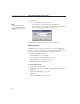
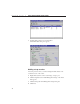
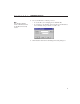
5 Choose the IP address of the trap receiver.
• To use the PC you’re managing from, click This PC.
• To send traps to another PC on the network, type the IP address
and community string of the PC you want to use.
6 Click OK, then click OK on the Management Setup dialog box.
Note
Press This PC in the Web
version of Intel Device View to
use the Web server as a trap
receiver.