HP Slate 10 Plus Tablet Maintenance and Service Guide IMPORTANT! This document is intended for HP authorized service providers only.
© Copyright 2014 Hewlett-Packard Development Company, L.P. Bluetooth is a trademark owned by its proprietor and used by Hewlett-Packard Company under license. SD Logo is a trademark of its proprietor. The information contained herein is subject to change without notice. The only warranties for HP products and services are set forth in the express warranty statements accompanying such products and services. Nothing herein should be construed as constituting an additional warranty.
Safety warning notice WARNING! To reduce the possibility of heat-related injuries or of overheating the device, do not place the device directly on your lap or obstruct the device air vents. Use the device only on a hard, flat surface. Do not allow another hard surface, such as an adjoining optional printer, or a soft surface, such as pillows or rugs or clothing, to block airflow. Also, do not allow the AC adapter to contact the skin or a soft surface, such as pillows or rugs or clothing, during operation.
iv Safety warning notice
Table of contents 1 Product description ........................................................................................................... 1 2 External component identification ..................................................................................... 3 3 Illustrated parts catalog .................................................................................................... 5 Locating the serial number location ......................................................................
Front-facing webcam .............................................................................................................. 26 Display panel cable ............................................................................................................... 27 6 Specifications .................................................................................................................. 29 7 Power cord set requirements ..............................................................................
1 Product description Category Description Product Name HP Slate 10 Plus Tablet Chipset/processor Balong® V9R1 Cortex-A9 quad core 1.60-GHz processor Graphics Integrated with soldered-on-circuit (SoC) Panel 10.
Category Description Ports ● Micro USB type B with MHL support ● Micro SD slot ● Micro SIM slot ● Audio jack: 3.5-mm with microphone and URAT support Power requirements Supports a 2-cell, 6280-mAh lithium-polymer, USB-charging battery Supports a 5V-2A, 10-W USB cable AC adapter 2 Operating system Preinstalled: Android 4.4 + EMUI 2.
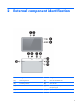
2 External component identification Item Component Item Component (1) Ambient light sensor (7) Micro SD Card Reader slot (2) Front-facing webcam (8) Micro SIM slot (3) Power button (9) Audio-out (headphone)/Audio-in (microphone) jack (4) Volume control button (10) Speakers 3
4 Item Component Item Component (5) Microphone (11) Micro USB port (6) Rear-facing webcam Chapter 2 External component identification
3 Illustrated parts catalog Locating the serial number location The tablet part number (1), serial number (2), and International Mobile Station Equipment Identity number (IMEI) (3) are located on the tablet back cover. This information may be needed when travelling internationally or when contacting support.
Tablet major components 6 Item Component Spare part number (1) Display panel assembly (10.
Item Component Spare part number (7) Speaker connector board for left speaker (includes power button and volume control buttons) 776017-001 (8) Speaker connector board for right speaker 776018-001 (9) Speaker Kit (includes left and right speakers) 776020-001 (10) 3.0-MP rear-facing webcam (includes cable) 776024-001 (11) System board equipped with a Balong V9R1 Cortex-A9 quad core 1.60-GHz processor, 1.
Miscellaneous parts Component Spare part number 10-W AC adapter: For use only in Europe 773125-009 For use only in India 773125-005 For use only in North America 773125-008 For use only in South Africa 773125-007 For use only in the United Kingdom 773125-003 HP Slate 7 VoiceTab Ultra Tablet: 8 HP Slate 10 Plus Tablet for use in all countries and regions except Europe, the Middle East, and Africa (equipped with a Balong V9R1 Cortex-A9 quad core 1.60-GHz processor, 10.
Sequential part number listing Spare part number Description 773125-003 10-W AC adapter for use only in the United Kingdom (includes plug) 773125-005 10-W AC adapter for use only in the India (includes plug) 773125-007 10-W AC adapter for use only in the South Africa (includes plug) 773125-008 10-W AC adapter for use only in the North America (includes plug) 773125-009 10-W AC adapter for use only in the Europe (includes plug) 776014-001 10.
4 Removal and replacement preliminary requirements Tools required You will need the following tools to complete the removal and replacement procedures: ● Flat-bladed screw driver ● Magnetic screw driver ● Phillips P0 screw driver ● Phillips P00 screw driver ● Torx T5 screw driver Service considerations The following sections include some of the considerations that you must keep in mind during disassembly and assembly procedures.
they cannot be caught or snagged by parts being removed or replaced. Handle flex cables with extreme care; these cables tear easily. Drive handling CAUTION: Drives are fragile components that must be handled with care. To prevent damage to the tablet, damage to a drive, or loss of information, observe these precautions: Before removing or inserting a drive, shut down the tablet.
CAUTION: To prevent damage to the tablet when you are removing or installing internal components, observe these precautions: Keep components in their electrostatic-safe containers until you are ready to install them. Before touching an electronic component, discharge static electricity by using the guidelines described in this section. Avoid touching pins, leads, and circuitry. Handle electronic components as little as possible. If you remove a component, place it in an electrostatic-safe container.
Packaging and transporting guidelines Follow these grounding guidelines when packaging and transporting equipment: ● To avoid hand contact, transport products in static-safe tubes, bags, or boxes. ● Protect ESD-sensitive parts and assemblies with conductive or approved containers or packaging. ● Keep ESD-sensitive parts in their containers until the parts arrive at static-free workstations. ● Place items on a grounded surface before removing items from their containers.
Equipment guidelines Grounding equipment must include either a wrist strap or a foot strap at a grounded workstation. ● When seated, wear a wrist strap connected to a grounded system. Wrist straps are flexible straps with a minimum of one megohm ±10% resistance in the ground cords. To provide proper ground, wear a strap snugly against the skin at all times. On grounded mats with banana-plug connectors, use alligator clips to connect a wrist strap.
5 Removal and replacement procedures CAUTION: Tablet components described in this chapter should only be accessed by an authorized service provider. Accessing these components can damage the tablet or void the warranty. NOTE: HP continually improves and changes product parts. For complete and current information on supported parts for the tablet, go to http://partsurfer.hp.com, select the country or region, and then follow the on-screen instructions.
CAUTION: Before positioning the tablet with display panel facing down, make sure the work surface is clear of tools, screws, and any other foreign objects. Failure to follow this caution can result in damage to the display panel. 1. Position the tablet with the display panel facing down and the SD Card Reader/SIM slot cover toward you. 2. Open the SD Card Reader/SIM slot cover (1). NOTE: The following screw should have a warranty tag (2) on it. This tag should not have any signs of tampering on it.
6. Separate the front edge of the display panel assembly (2) from the back cover, and then swing the display panel assembly up and back until it rests upside down next to the back cover. 7. Release the ZIF connector (1) to which the display panel cable is attached. 8. Detach the display panel cable (2) from the display panel assembly. (The display panel cable is attached to the display panel assembly with double-sided adhesive.) 9.
Antenna Description Spare part number Antenna (includes double-sided adhesive) 776022-001 Before removing the antenna, follow these steps: 1. Turn off the tablet. If you are unsure whether the tablet is off or in Hibernation, turn the tablet on, and then shut it down through the operating system. 2. Disconnect the power from the tablet by unplugging the power cord from the tablet. 3. Disconnect all external devices from the tablet. 4.
Connector board Description Spare part number Connector board (includes USB power connector, audio jack, and vibrator module) 776025-001 Before removing the connector board, follow these steps: 1. Turn off the tablet. If you are unsure whether the tablet is off or in Hibernation, turn the tablet on, and then shut it down through the operating system. 2. Disconnect the power from the tablet by unplugging the power cord from the tablet. 3. Disconnect all external devices from the tablet. 4.
Battery Description Spare part number 2-cell, 6280-mAh, Li-ion, USB-charging battery (includes cable and double-sided adhesive) 776016-001 Before removing the battery, follow these steps: 1. Turn off the tablet. If you are unsure whether the tablet is off or in Hibernation, turn the tablet on, and then shut it down through the operating system. 2. Disconnect the power from the tablet by unplugging the power cord from the tablet. 3. Disconnect all external devices from the tablet. 4.
4. Disconnect the battery cable (1) from the system board. 5. Insert a case utility tool (2) between the battery and the back cover, and then detach the battery (3) from the back cover. 6. Remove the battery (4). Reverse this procedure to install the battery.
Remove the speaker connector boards: 1. Release the ZIF connector (1) to which the left speaker connector board cable is attached, and then disconnect the left speaker connector board cable from the system board. 2. Remove the three Torx T5M1.3×3.7 screws (2) that secure the left speaker connector board to the back cover. 3. Remove the left speaker connector board (3).
4. Remove the right speaker connector board. Reverse this procedure to install the speaker connector boards. Speakers Description Spare part number Speaker Kit (includes left and right speakers) 776020-001 Before removing the speakers, follow these steps: 1. Turn off the tablet. If you are unsure whether the tablet is off or in Hibernation, turn the tablet on, and then shut it down through the operating system. 2. Disconnect the power from the tablet by unplugging the power cord from the tablet.
▲ Remove the speakers. Reverse this procedure to install the speakers. Rear-facing webcam Description Spare part number 3.0-MP rear-facing webcam (includes cable) 776024-001 Before removing the rear-facing webcam, follow these steps: 1. Turn off the tablet. If you are unsure whether the tablet is off or in Hibernation, turn the tablet on, and then shut it down through the operating system. 2. Disconnect the power from the tablet by unplugging the power cord from the tablet. 3.
2. Remove the rear-facing webcam (2) and cable. Reverse this procedure to install the rear-facing webcam. System board Description Spare part number System board equipped with a Balong V9R1 Cortex-A9 quad core 1.60-GHz processor, 1.0-GB of system memory, 8-GB eMMC system storage, and a graphics subsystem with UMA memory 776019-001 Before removing the system board, follow these steps: 1. Turn off the tablet.
2. Remove the system board (2). Reverse this procedure to install the system board. Front-facing webcam Description Spare part number 0.3-MP front-facing webcam (includes cable) 776023-001 Before removing the front-facing webcam, follow these steps: 1. Turn off the tablet. If you are unsure whether the tablet is off or in Hibernation, turn the tablet on, and then shut it down through the operating system. 2. Disconnect the power from the tablet by unplugging the power cord from the tablet. 3.
3. Remove the front-facing webcam (2) and cable. Reverse this procedure to install the front-facing webcam. Display panel cable Description Spare part number Display panel cable (includes double-sided adhesive) 776021-001 Before removing the display panel cable, follow these steps: 1. Turn off the tablet. If you are unsure whether the tablet is off or in Hibernation, turn the tablet on, and then shut it down through the operating system. 2.
3. Disconnect the display panel cable (2) from the system board. Reverse this procedure to install the display panel cable.
6 Specifications Metric U.S. Height 17.59 cm 6.93 in Width 25.74 cm 10.13 in Depth 0.99 cm 0.39 in Weight 640 g 1.41 lb Dimensions (Landscape orientation) The voice tablet operates on DC power, which can be supplied by an AC or a DC power source. The AC power source must be rated at 100-240 V, 50/60 Hz, 0.3-1.0 A. NOTE: The voice tablet can operate on DC power using an industry-standard micro-B USB cable.
7 Power cord set requirements The wide-range input feature of the tablet permits it to operate from any line voltage from 100 to 120 volts AC, or from 220 to 240 volts AC. The 3-conductor power cord set included with the tablet meets the requirements for use in the country or region where the equipment is purchased. Power cord sets for use in other countries and regions must meet the requirements of the country or region where the tablet is used.
Country/region Accredited agency Applicable note number Germany VDE 1 Italy IMQ 1 Japan METI 3 The Netherlands KEMA 1 Norway NEMKO 1 The People's Republic of China COC 5 South Korea EK 4 Sweden CEMKO 1 Switzerland SEV 1 Taiwan BSMI 4 The United Kingdom BSI 1 The United States UL 2 1. The flexible cord must be Type HO5VV-F, 3-conductor, 1.0-mm² conductor size.
8 Recycling When a non-rechargeable or rechargeable battery has reached the end of its useful life, do not dispose of the battery in general household waste. Follow the local laws and regulations in your area for battery disposal. HP encourages customers to recycle used electronic hardware, HP original print cartridges, and rechargeable batteries. For more information about recycling programs, see the HP Web site at http://www.hp.com/recycle.
Index A AC adapter, spare part numbers 9 ambient light sensor 3 antenna removal 18 spare part number 6, 9, 18 audio, product description 1 audio-in jack 3 audio-out jack 3 B back cover removal 15 spare part number 7, 9, 15 battery removal 20 spare part number 6, 9, 20 buttons power 3 volume control 3 C cables, service considerations 10 chipset, product description 1 connector board removal 19 spare part number 6, 9, 19 connectors, service considerations 10 D display panel assembly removal 15 spare part num
serviceability 2 storage 1 video 1 wireless 1 product name 1 R rear-facing webcam location 4 removal 24 spare part number 7, 9, 24 Rubber Kit, spare part number 8, 9 S Screw Kit, spare part number 8, 9 SD Card Reader slot 3 sensors, product description 1 service considerations cables 10 connectors 10 plastic parts 10 serviceability, product description 2 SIM slot 3 speaker connector board removal 21 spare part numbers 7, 9, 21 Speaker Kit, spare part number 7, 9, 23 speakers location 3 removal 23 spare part