
- HP L2045w 20" LCD Monitor User Guide
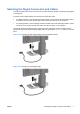
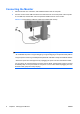
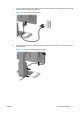
Table Of Contents
- Product Features
- Safety and Maintenance Guidelines
- Setting Up the Monitor
- Operating the Monitor
- Troubleshooting
- Technical Specifications
- Agency Regulatory Notices
- LCD Monitor Quality and Pixel Policy
Selecting the Signal Connectors and Cables
The monitor features one DVI-D connector and one VGA connector capable of supporting either digital
or analog input.
The video mode is determined by the connector and video cable used.
●
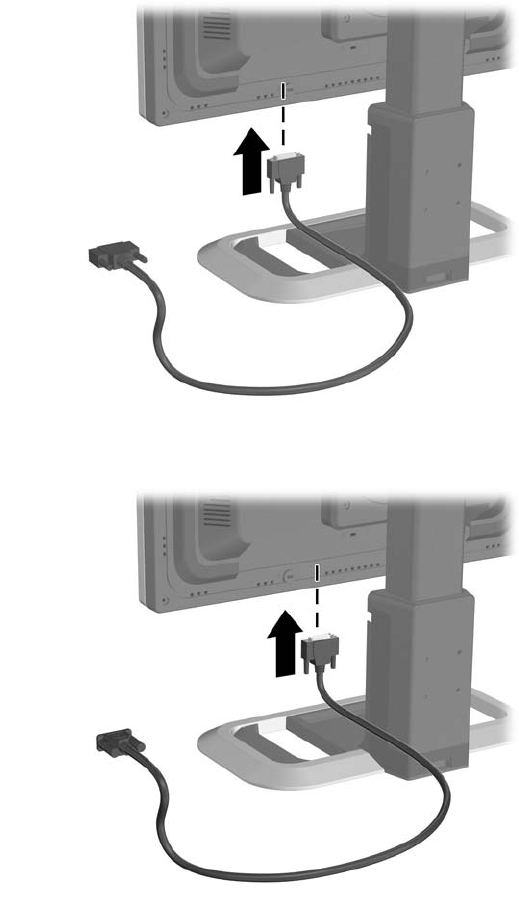
For digital operation, use an optional DVI-D signal cable. Connect the DVI-D signal cable to a DVI-
D connector on the monitor and the other end to the DVI-D connector on the computer.
●
For analog operation, use the VGA signal cable provided. Connect the VGA signal cable to a VGA
connector on the monitor and the other end to the VGA connector on the computer.
The monitor will automatically determine which inputs have valid video signals. The inputs can be
selected through the On-Screen Display (OSD) feature by pressing the Input Select button on the front
panel.
Figure 3-3 Connecting the DVI-D Signal Cable (not included with monitor)
Figure 3-4 Connecting the VGA Signal Cable
ENWW Selecting the Signal Connectors and Cables 7