
- HP L2045w 20" LCD Monitor User Guide
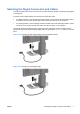
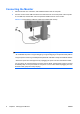
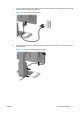
Table Of Contents
- Product Features
- Safety and Maintenance Guidelines
- Setting Up the Monitor
- Operating the Monitor
- Troubleshooting
- Technical Specifications
- Agency Regulatory Notices
- LCD Monitor Quality and Pixel Policy
Connecting the Monitor
1. Place the monitor in a convenient, well-ventilated location near the computer.
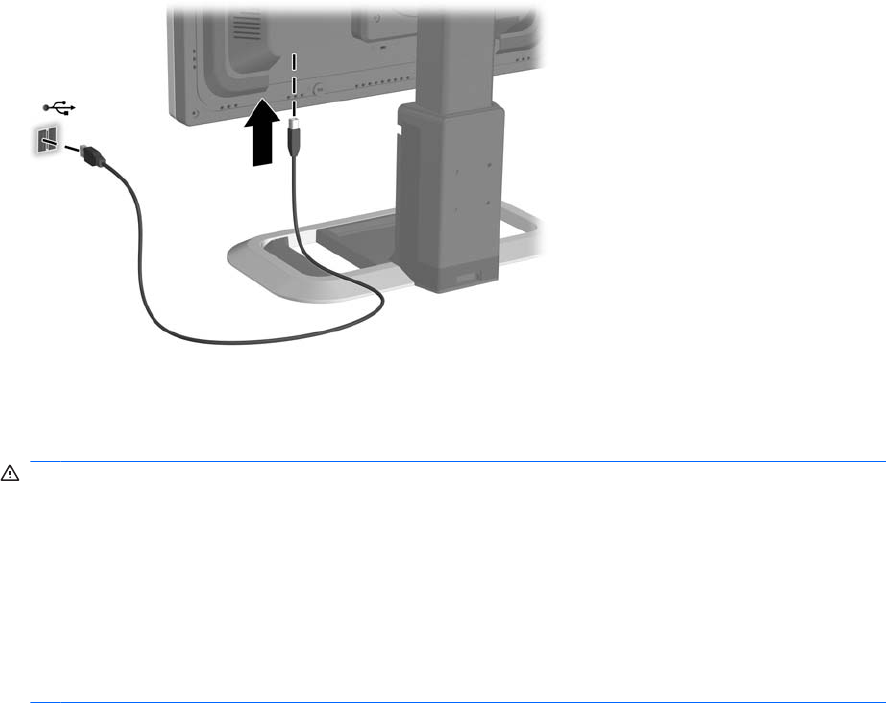
2. Connect one end of the USB hub cable to the USB connector on the rear panel of the computer
or to a USB hub, and the other end to the upstream USB connector on the monitor.
Figure 3-5 Connecting the USB Hub Cable (not included with monitor)
WARNING! To reduce the risk of electric shock or damage to the equipment:
• Do not disable the power cord grounding plug. The grounding plug is an important safety feature.
• Plug the power cord into a grounded (earthed) electrical outlet that is easily accessible at all times.
• Disconnect power from the equipment by unplugging the power cord from the electrical outlet.
For your safety, do not place anything on power cords or cables. Arrange them so that no one may
accidentally step on or trip over them. Do not pull on a cord or cable. When unplugging from the
electrical outlet, grasp the cord by the plug.
8 Chapter 3 Setting Up the Monitor ENWW