
HP Enterprise MFP, HP Managed MFP - Copying or Digitally Scanning Highlighted Images (white paper)

3
Affected Products & Firmware Revisions Needed
Model
Minimum Firmware Revision
HP Color LaserJet Enterprise M527 MFP
FutureSmart 3.6
HP Color LaserJet Enterprise M577 MFP
FutureSmart 3.6
HP Color LaserJet Enterprise M630 MFP
FutureSmart 3.6.1
HP Color LaserJet Enterprise M680 MFP
FutureSmart 3.6.1
HP LaserJet Enterprise M725 MFP series
FutureSmart 3.5.4
HP Color LaserJet Enterprise M775 MFP series
FutureSmart 3.6.1
HP LaserJet Enterprise M830 MFP series
FutureSmart 3.5.2
HP Color LaserJet Enterprise M880 MFP
FutureSmart 3.5.2
HP OfficeJet Enterprise X585
FutureSmart 3.6.1
How to Enable FW Enhancement
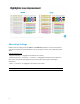
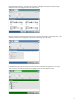
From the Home screen, select the desired scanning application (Copy, E-Mail, Save to Network Folder,
etc). Then select More Options>Optimize Text/Picture >Text button (not slider). This will invoke the
improved color reproduction of fluorescent highlighters.
NOTE: Administrators can set Text as the default setting on the device.